
You might have heard the name Mobapad before. They’re one of the more popular Switch accessory and controller makers. With the $80 price tag on the first party Nintendo Switch 2 Pro controller, I knew that it was only a matter of time till Mobapad launches a competitor at a better value. There have been others, of course. But the Chitu 2 by Mobapad is the first one that I’ve seen featuring the “smooth glide” frictionless sticks! It offers a lot more than just that, of course. And at a price of just $50 it manages to be better than the original Nintendo Switch 2 Pro controller in my opinion. Let us see how, in this review.
SPEC SHEET
- Layout: Xbox
- Connectivity: Wired, Bluetooth
- Compatibility: Nintendo Switch, Switch 2, PC, Android, iOS
- Sticks: TMR, Smooth Glide sticks
- Triggers: Micro Switch digital triggers
- Extra Buttons: 2 Rear Buttons
- Battery: 1000mAh
- Polling Rate: 1000Hz
- Colors: White, Black, Pink
- Software: Mobapad mobile app
- Price: around $50 without dock, $66 with dock
UNBOXING & Sound Test
You can see all the contents of the box, and also the charging dock accessory in this short video by me.
In the box, we find :
- The controller
- A user manual
- An extra cross-style dpad
- A USB-A to USB-C cable
And in a separate box we get the Charging dock and a short USB-A to USB-C cable for it.
Since this is a Switch 2 focused controller, you don’t get a USB dongle for connecting to PC. But the controller does work on PC and android if you connect it with Bluetooth or a wired connection.
Edit: They have also released a Silent edition of this controller, check out our comparison of Chitu 2 HD Standard and Silent edition.
BUILD & APPEARANCE
The Mobapad Chitu 2 comes in 4 colourways – Matte Black, Glossy Black, Glossy White, and Matte Pink (it’s a gradient from pink to purple, as you can see on my unit.

One important thing to note is that the black and white variants have a glossy faceplate. The matte black and pink one have a matte finish. The glossy faceplate attracts a good amount of smudges and fingerprints, so if you want to avoid that, you should consider the matte options.


The Chitu 2 looks so dang cute. It’s shaped somewhere between the Switch 2 pro controller and an Xbox controller. The ergonomics of this controller are good. It’s a little thicker than the Switch 2 Pro controller, so it feels nicer in my large hands. At a weight of 250grams or so, the Chitu 2 is comfortable for long gaming sessions as well.
The back half of the handles has textured plastic, no rubber. It provides ample grip, and the lighter colours won’t get stained over time like rubber does. I do like rubber grips though, but this textured plastic provides more than enough grip so it’s not a complaint. Under certain lighting conditions, the grip texture looks like gamecube logos :3

The front faceplate is attached with magnets and is removable. This lets us see some of the interesting internal mechanisms which we’ll get to later.
I love the pink colourway. The gradient from pink to purple is such a unique look, and the purple accents on the ABXY buttons and the thumbsticks makes it even sweeter.
The Mobapad logo lights up and serves as an indicator for many things such as connection status. I’m not quite sure what the 4 LEDs at the bottom are for. Probably battery level?
ANALOG STICKS

The Mobapad Chitu 2 uses TMR sticks. These are super accurate and power efficient, which results in a long battery life. The stick resolution here is about 2000, which is impressive in a controller meant to be used in 125Hz on the Switch 2. We’ll talk more about this later, in the latency section.
The sticks are extra smooth because they use Smooth Glide mechanism, similar to the switch 2 pro controller. It’s basically a silicone internal restriction ring which feels buttery smooth. As the faceplate is easy to remove, you can easily see this mechanism here.

The sticks are quite light here. Usually stick tension is about 45gf, but the tension in the Chitu 2 is less than 35gf. It feels very light, but still accurate. I like it.
All in all, I’m a big fan of these sticks.
ABXY BUTTONS

The Chitu 2 uses mechanical, clicky ABXY buttons. They’re in the switch layout so calling it BAYX would be more accurate XD. You don’t get the option to switch to Xbox layout as the buttons are not physically removable like in the TT Pro I recently reviewed. But it does switch to an Xbox layout in the software when on Xinput mode, so pressing B will input A.
I like the thin, funky font they use here. It looks sleek and futuristic, while somehow not looking out of place on this cutesy controller.
The buttons feel great to use and are very responsive. They don’t have much pre or post travel, and they click really well. The buttons have a thin silicone dome structure over the microswitch, which gives it a nice, soft feel at first, and then BAM, you find the tactility. The buttons have a rather flat face, which I like a lot. The buttons stay a little bit out of the shell when pressed down, and they don’t go flush with the faceplate. This has been a very enjoyable experience.
D-PAD

The Mobapad Chitu 2 has a mechanical D-pad with light microswitches. By default, it comes with a disc style d-pad, but a cross style d-pad is also included in the box, which I prefer to use.
The D-pad feels great, and it’s very precise. Diagonals are perfect IMO and the central pivot is excellent. The one gripe I have with this personally is how much travel there is before actuation. It feels really nice and bouncy to press, but this travel has lead to a couple of missed inputs in my case. I believe this is because of how often I swap controllers, and it wouldn’t be an issue if I just got used to solely using this controller.
But excellent experience all around aside from this one minor personal complaint.
SHOULDER BUMPERS & TRIGGERS

The shoulder bumpers and triggers both are excellent. They have a nice grippy stippling on them, which feels quite nice to use.
The shoulder buttons are mechanical and tactile. Not much else to say here. It just feels nice and needs just the right amount of force to actuate. There isn’t any rattle or other noises on my unit.
The triggers are digital triggers with a microswitch mechanism. So this isn’t suitable for genres like racing games on PC. But I’ve been having a blast with other games like Silksong and even FPS games. I even got my highest score yet on Aimlabs with this controller.
There’s a very unique feel to the triggers here. It’s because the actuation and the tactility is in the middle of the travel instead of at the beginning like most controllers with microswitch triggers. This feels really nice. Imagine plucking a kalimba or stepping on a crunchy leaf. That’s kind of what this feels like. Difficult to explain, but it’s great. The mechanism is akin to a clicky mechanical keyboard switch, but this feels much better actually.
EXTRA BUTTONS

The Chitu 2 has two back buttons which are placed in an excellent and comfortable position. They feel nice to press.
You can assign macros or turbo to the back buttons. I just use the back buttons as L3 and R3 because I hate pressing down on the sticks. That’s just me though.
HAPTICS
One of the main features of the Mobapad Chitu 2 is the haptics. It supports Full HD Rumble, which lets you experience the complete Switch gaming experience. The rumble feels nice and probably the best I’ve felt from a third party switch controller. It’s stronger than the original Switch 2 Pro Controller, but the first party option has a slightly more detailed rumble. Overall, I prefer the Chitu 2’s rumble over the Switch 2 Pro Controller.
GYROSCOPE
The Chitu 2 features 6 axis gyro controllers and it feels pretty good. I don’t play a lot of gyro games, but from what I can see, it’s fairly accurate.
BATTERY LIFE
The controller comes with a 1000mAh battery. It lasts about 15 hours or so with regular use. If your application has more rumble, it might last a little less.
Charging Dock
The Charging dock for the Chitu 2 is available to purchase separately, or as part of a bundle with the Chitu 2 (The bundle saves you about $7). It’s quite nice and sleek. The charging status is indicated by the Mobapad logo on the controller itself. The charging dock has some RGB which looks pretty good.
The dock also has an extra USB-A port in the back, next to the USB-C port which you use for power. Pretty handy as it replaces the USB slot that you used on your PC.
The magnet in the dock is quite strong, and the dock is quite light. This results in you lifting the dock along with the controller if you just lift it straight up. Instead, you have to pull the controller towards yourself a little bit, kind of like peeling a velcro. It’s not a big bother or anything, just something that I noticed. Figured I should let you know cuz maybe things like this annoy you.
OTHER NOTABLE FEATURES
- Switch Wake-Up function
- Macro and Turbo functionality
- NFC support
CONNECTIVITY & LATENCY

The Mobapad Chitu 2 has a wired mode and a bluetooth mode. There isn’t a dedicated 2.4gHz mode or an included 2.4gHz adapter. I wish the wireless performance on PC was a better, because the latency is quite high in bluetooth mode – about 15ms. This number is okay for the nintendo switch, but for PC, I would like to see something under 5ms. This isn’t an impossible ask either, since other brands like Gulikit have done it on multiple controllers now. I mean, it’s also not a dealbreaker unless you’re playing competitive titles… but the Chitu 2 is probably not your pick for those types of games anyways.
Here are the numbers –
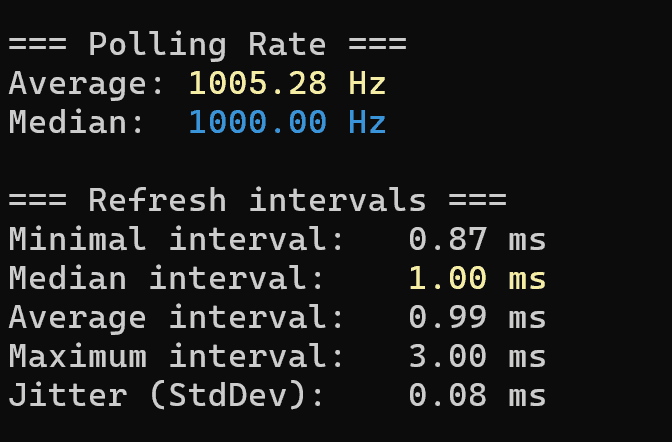

The first image is wired and the second is bluetooth connection to my PC.

As you can see, the button and stick latency are not bad per se, but they’re not industry leading either. It’s perfectly fine for most people.
CONCLUSION
I love this controller. It offers an excellent experience while being more affordable than the official Switch Pro 2 controller. I especially like the triggers and the overall tactility of this controller.
I’d say this is a must buy if you’re looking for a Switch 2 Pro controller alternative.
Mobapad
Chitu 2


Hello! 🥰 I'm Fang.
I like gaming and related tech. I enjoy learning more, and sharing my experiences through my review videos and blog posts. Have fun! 💖