


Apart from controllers, there is one thing I love above all else. And no, it is not my homeland – it is Japanese culture. And the subject of Vocaloids is inextricably linked to Japanese culture. As a fan of probably the most popular character, Hatsune Miku, when I saw the creation that is Palmlab M.001, I immediately decided that it was a controller that had to appear on my shelf (even though it is not an official collaboration, my warped mind immediately saw the reference). And since it is also interesting from the technical side, I invite you to review this controller.
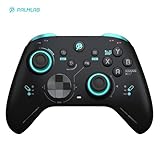
- Superior Gaming Operation Experience:Our game controller is designed for gamers who pursue the ultimate gaming experience. It is equipped with Hall – effect joysticks and triggers, which are not only more stable and durable but also tuned at an e – sports level, featuring higher precision and sensitivity. Whether it’s precisely aiming in an intense shooting game or making delicate turns in a racing game, it can be easily handled. Meanwhile, the two remappable paddles on the controller allow you to unlock complex combos with just one click, providing convenient and efficient operation and helping you get an edge in the game.

Packaging
Palmlab M.001 comes to us in a medium-sized package. On the front of the dust jacket we will find (most likely) a render of the controller, and on the back – information about the contents of the set and a very basic specification. After removing the dust jacket, a rather aesthetic box is revealed, and after opening it – the controller itself (you can see that someone put a lot of effort into the presentation). On the inside of the top cover we will also find a slightly more detailed specification. Under the controller itself, in the packaging, there is a (horrendously large) 2.4G receiver and a USB-C cable.


Specifications
- Layout: Xbox
- Compatibility: PC, Mobile, Nintendo Switch
- Connectivity: Wired, 2.4G, BT
- Analogs: K-Silver JH16 (hall effect)
- Triggers: Hall Effect with trigger lock
- Main switches: Membrane (ABXY) and mechanical (D-Pad)
- Additional switches: 2 on the back
- Gyroscope: Present (Switch mode)
- Vibration motors: 2 Asymmetric
- Battery: 800mAh
- Polling rate: 500Hz Wired
- Available color versions: Black
- Docking station: None
- Price: $40
The specification comes from the manufacturer’s website and my own observations.
Initial impressions and observations
Starting with the USB cable – we are dealing with a rather pleasantly long braided cable here. When it comes to its stiffness, it is neither bad nor great, but a plus is due for the fact that it is not the most ordinary cable possible. The 2.4G receiver, as I have already mentioned, is horrendously large. In practice, this means that when connecting it to the back of the computer case, it may slightly collide with the wall or furniture. When it comes to its construction – apart from the diode indicating pairing and a large inscription with the manufacturer’s name, we will not find anything else on it.

Moving on to the controller itself – the M.001 is a fairly compact design, clearly referring in design to the original Microsoft controller. Due to its slightly smaller size, it should fit better in the hands of people with a smaller grip. When it comes to the quality of the materials used, there is no reason to dramatize – the plastics are admittedly quite smooth, but they should not cause discomfort even during longer sessions. The quality of the prints on the casing is also a plus – they look aesthetically pleasing and don’t give the impression that they will wear off after a few weeks of use.


I can technically skip the thumbstick rockers in the M.001 – they used K-Silver JH16, which is nothing particularly interesting at the moment. So let’s move on to the knobs themselves. They are quite hard, but they still hold well under the finger. Additionally, something like an anti-friction ring has been used here. However, it is not a classic POM ring, but rather an RGB ring – despite this, the movement remains smooth and does not cause any problems.
The switches under the ABXY buttons are membranes – quite good, by the way. True, they are not the softest, but thanks to this they offer quite pleasant tactile feedback.
Mechanical switches are used under the D-Pad, with a fairly hard membrane above them. Here too, the feeling is quite okay, although it does not stand out in any way.
The tuning of the switches is decent, but it lacks something – it lacks that “something” that would make the whole thing more interesting. In addition, the quality of the switches themselves is unfortunately rather average.

Moving on to the top of the M.001 — we will find a lot of blue color with a slight metallic shine. The triggers are eye-catching, offering quite a pleasant stroke, resistance and angle of attack. Unfortunately, it is difficult to ignore the rather large dead zone at the end of their range, which may bother more demanding users. On the plus side — the presence of a trigger lock. Although this is not a solution based on a microswitch, but a regular stopper, it is worth appreciating that there is no lack of a mechanism for switching triggers between analog and digital mode — always something. The bumpers are there — and they work properly. There are no fireworks here, especially since the switches used are, in my opinion, slightly too hard. At the top we will also find a pairing switch — simple, but fulfilling its function.

At the back, in addition to the connection mode switch, we find two remapping buttons. They are quite small and have a large travel. The switches used under them are rather hard, and their operation is not impressive – the travel is rubbery, without any noticeable tactile feedback. Their location is also a disadvantage – they can be difficult to hit and press, especially during dynamic gameplay.
Let’s take a look inside
To get inside the M.001, just unscrew six screws at the back. Thanks to the relatively light latches, disassembly is not a big problem. After opening, we will find all kinds of switches on the front, while at the back – the battery compartment and rear buttons. The overall quality of the PCB does not raise any objections, although it is difficult to say that it is something particularly outstanding, although it could be slightly better cleaned..


Synthetic tests
Moving on to the issue of latency in M.001, in wired mode on switches we have about 4 ms with a polling rate of 500 Hz, with spikes of about 8 ms in XInput mode and about 7 ms with spikes of up to 10 ms at 200 Hz in DInput mode. After switching to 2.4G connection, latency increases to about 15 ms with quite high spikes of up to 30 ms at a polling rate of about 150 Hz in XInput and DInput modes, while in Switch mode the average latency is close to 30 ms at a polling rate of about 100 Hz. I will skip Bluetooth, because it offers nothing worth mentioning.

Analog latency is a big disappointment. While the latency of switches in wired mode was acceptable (even quite good), 16 ms wired in XInput mode is quite a big disappointment and the result is definitely far from satisfactory – for me almost on the border of acceptability. DInput mode improves the situation a bit, but it is still far from ideal (and remember that then you have to play around with Xinput emulation). The fact that I did not notice any regression in wireless mode is a minor relief.
Moving on to stick calibration, the one in M.001 is at best acceptable. Analog asymmetry is practically non-existent, but the outer dead zone is very similar to a diamond, not a circle, which is quite disappointing. Additionally, the inner dead zone cannot be removed in any way (although I do not rule out that I may have missed a shortcut). For this reason, I was also unable to test the recentering function.

As for the sensor resolution, theoretically we have the announced 1024 positions. Why “only theoretically”? When performing rotary movements, the step resolution is indeed around 0.0010, or around 1000 positions in simplified terms. However, if we look at the analog linearity graph – or rather its lack, because unfortunately we will not see any compensation for sensor nonlinearity here – it turns out that the effective resolution is only about 75-80 positions. Honestly, I do not understand this at all and I am not able to explain it in any way. As for the sensor linearity or its compensation, we will not see it, it is pure raw input from the sensor.

To finish the issue of tests, the battery in the M.001 lasts about 10 hours, and the charging time is about 2-3h.
Software
The software responsible for the M.001 is Keylinker, so if you want to know more, I refer you to my review of the EasySMX X20.
Palmlab M.001 Summary
To be honest, I did not have high expectations for this product. Technically, it’s not bad (well, maybe except for the rear switches and D-Pad), but the pains associated with the underdeveloped firmware make the M.001 not really worth recommending. For me, it’s just another exhibit in an ever-growing collection.
This review was made possible by Palmlab.
✅ Pros
- Non-dramatic main switches
- Eye-catching design
❌ Cons
- Horrendously underdeveloped firmware
- Quite weak additional switches
I focus on reviewing PC controllers and sim racing accessories.


