


I recently went looking for a PC case with a screen. I thought it would be great to have SensorPanel there, but it would also be a great solution if I had any problems with my monitor and needed to temporarily use the screen for booting up Windows or Linux. I’ve since updated this list — a couple of the original picks got discontinued, so here’s what’s actually still available and worth buying in 2026.
Hyte Y70 Touch
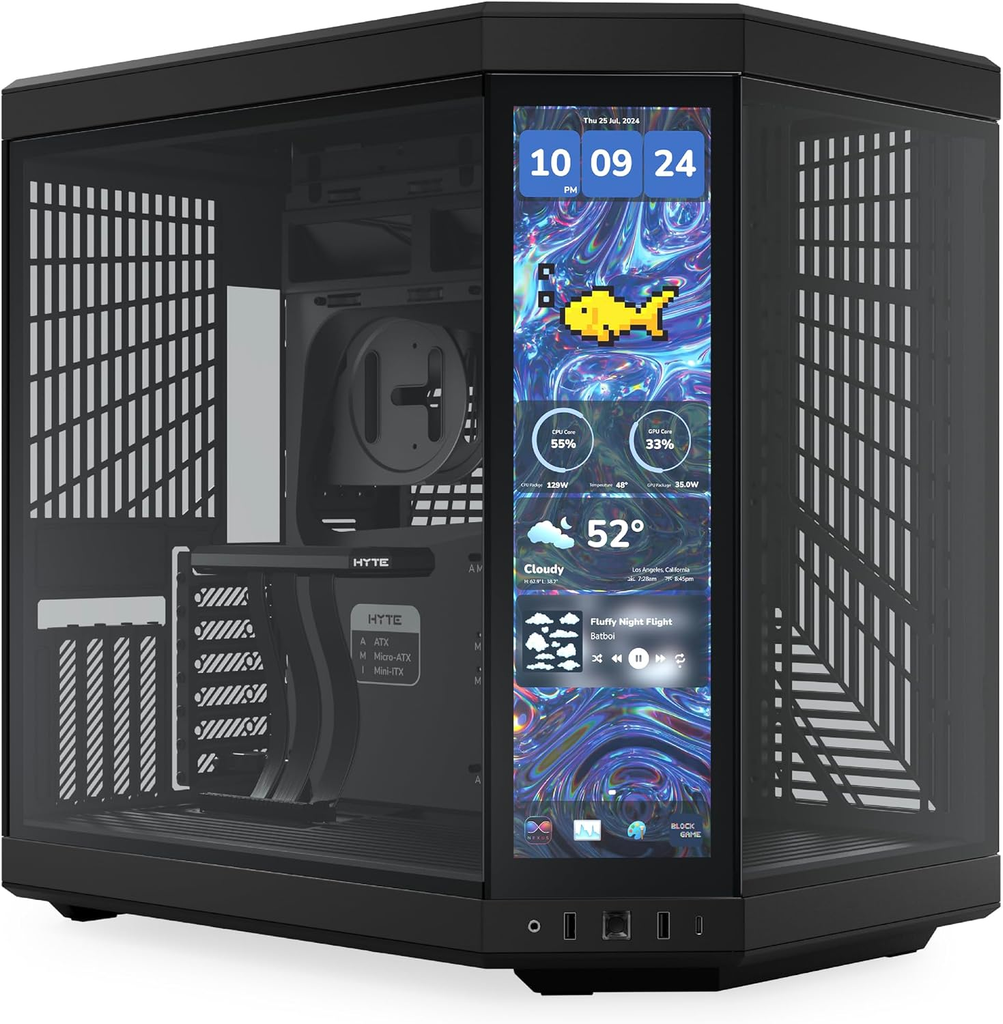
If budget isn’t the main constraint, the Y70 Touch is the current standout case. It has a 4K interactive touchscreen built into a cut-away front corner, running on Hyte’s Nexus software — and unlike most case displays, it actually functions as a second Windows display rather than just a stats readout.
Pros
- The touchscreen is a real secondary monitor — live backgrounds, system info widgets, quick-launch shortcuts, not just a fixed dashboard.
- Spacious dual-chamber interior: room for up to 10 fans and three radiators.
- Glass panels flanking the screen give a full view of your build.
Cons
- Expensive — this is a premium case, priced well above the other picks here.
- The touch panel needs a spare DisplayPort 1.4 output from your GPU to work.
- Bulkier than the other cases on this list — measure your desk space first.
This is the case for someone who wants the screen to be more than a temperature readout — it’s a legitimate secondary display for widgets, media, or quick system control.
Zalman Z10 DS ATX Mid-Tower with 1080P Full HD Display
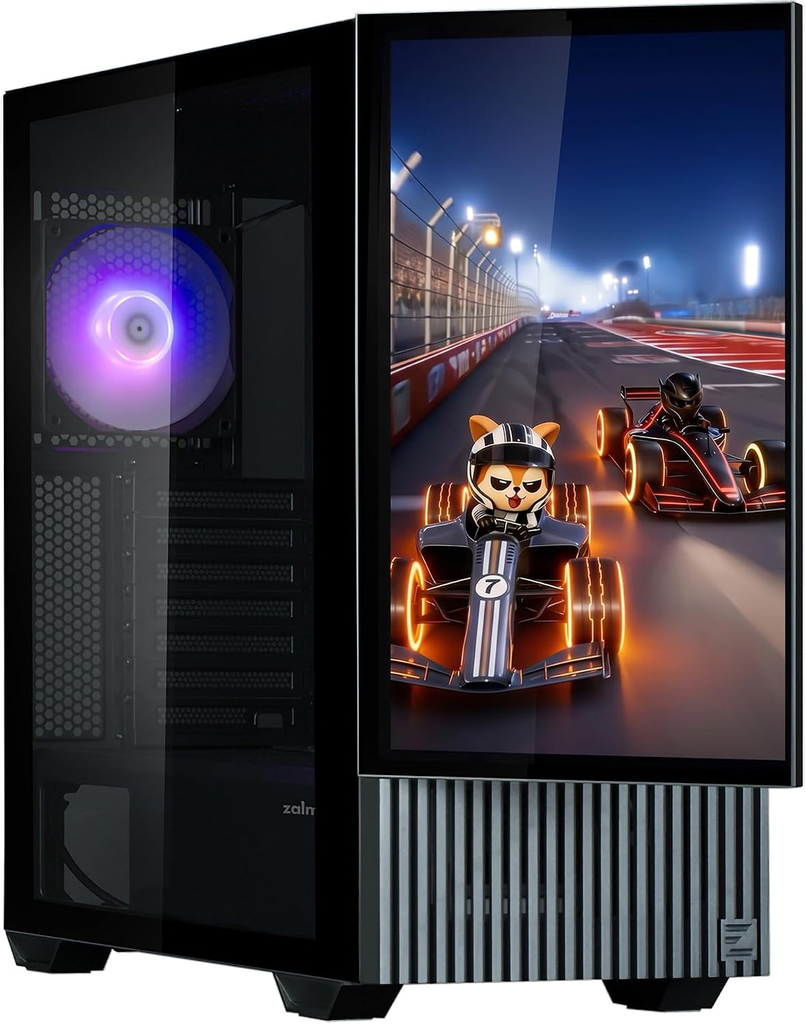
This one’s a genuinely different approach from the rest of the list: instead of a small stats panel, the Z10 DS has a full 15.6″ Full HD (1920×1080) IPS display built into the front — and it fully detaches. Pop it off, use the included stand, and it works as a standalone secondary monitor even when it’s not attached to the case.
Pros
- The display is a real 1080p 16:9 IPS panel (170° viewing angle, 60Hz), not a small square status readout — genuinely useful for media or as an actual second screen, on or off the case.
- Fully detachable with an included stand, so it’s not locked to the case.
- Solid build specs: clearance for 395mm GPUs, 173mm coolers, and 360mm radiators, with 4mm tempered glass and a tool-free interior.
- Connects over Mini-HDMI + USB-C, so no proprietary software lock-in for basic use.
Cons
- Only 3 fans included, and two of them aren’t ARGB — expect to budget for more fans if you want a fully lit-up build.
- The 3.5″ drive cage only comes with tool-less rails for one drive; a second requires manual screws and removing the cage.
- At 250 cd/m² brightness, it’s noticeably dimmer than a proper monitor — fine for stats and casual media, less great in a bright room.
This is the pick for someone who actually wants to use the screen as a screen (watching something, monitoring a second application) rather than just a temperature gauge.

JONSBO D41 MESH SC Black ATX Computer Case with Screen
If you’re looking for a PC case with a screen, the JONSBO D41 MESH SC Black ATX Computer Case with Screen is definitely worth considering. This is the one I bought and kept personally.
Pros
- The included screen is a great addition for monitoring your system’s performance and temperature.
- The compact size makes it easy to fit into a smaller space.
- The multiple tool-free design makes it easy to install and upgrade components.
- The screen works with Windows and it’s detachable!
Cons
- The case lacks any included fans, which means you’ll need to purchase them separately.
- It only has one USB 3.0 port, which may be inconvenient for some users.
- The wire management space is limited, which may make it difficult to keep cables organized.
Overall, we think the JONSBO D41 MESH SC Black ATX Computer Case with Screen is a great choice for anyone looking for a compact case with a built-in screen. The screen is a great feature that allows you to easily monitor your system’s performance, while the compact size makes it easy to fit into smaller spaces.

The multiple tool-free design also makes it easy to install and upgrade components. It can run Windows and PC games which is really fun gimmick. However, the lack of included fans and limited wire management space are potential downsides to consider.
If you’re interested in purchasing the JONSBO D41 MESH SC Black ATX Computer Case with Screen, you can find it here.
Lian Li Lancool 207 Digital
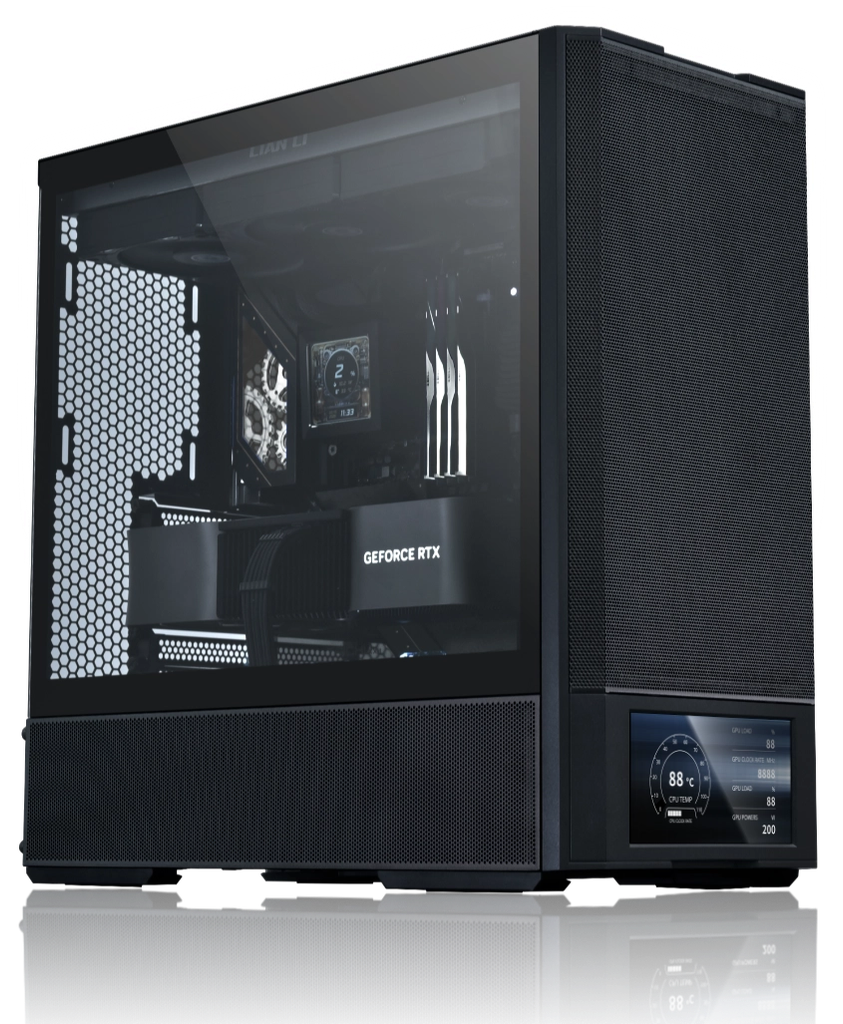
Tom’s Hardware named this their pick for “Best PC Case With a Screen” in their 2026 case roundup, and it’s easy to see why — it packs a 6-inch, 720×1600, 60Hz, 500-nit LCD into a compact M-ATX-sized chassis that still takes full ATX motherboards, for around $105.
Pros
- The 6″ display is genuinely useful — powered by Lian Li’s L-Connect 3 software, with ~30 built-in templates for real-time CPU/GPU stats, or you can load your own images/animations.
- Four fans pre-installed (two 140mm front, two 120mm bottom) — no extra spend needed to get airflow going, unlike the Jonsbo cases.
- Compact footprint (456 x 219 x 455.6mm) without sacrificing ATX motherboard or full-size GPU support (up to 375mm).
- Supports a 360mm radiator up front.
Cons
- Front-mounted PSU placement is a departure from traditional layouts — some builders will need to adjust their usual cable routing habits.
- Only 160mm max PSU length, which rules out some larger units.
- No mesh side panel option if you want maximum airflow over aesthetics.
Overall, this is the case we’d point most people toward now — it’s current, in stock, and genuinely well-reviewed, not just “has a screen” as a gimmick.
DeepCool CH510 MESH Digital Mid-Tower ATX PC Case with LCD Display Magnetic Tempered Glass Gaming Case High-Airflow Panels with Front I/O USB Type-C Port for Mini-ITX/Micro-ATX/E-ATX, Black

If you’re looking for a PC case with a screen, the DeepCool CH510 MESH DIGITAL is a great option with its practical visual design element that serves a simple yet functional purpose.
Pros
- The CH510 MESH DIGITAL PC case is designed for high airflow performance to build an efficient cooling system thanks to the generous mesh open area in the front, top, and rear to allow ample airflow.
- The built-in digital display in the front panel of the CH510 MESH DIGITAL gaming case allows you to monitor system information for critical CPU or GPU temperatures, which is a practical visual design element that serves a simple yet functional purpose.
- The CH510 MESH DIGITAL PC case display of the temperature either on the CPU or GPU can be shifted upon a simple click, and up to 11 different selectable languages suffice users from worldwide, and Celsius and Fahrenheit figures can be switched over following user’s need.
Cons
- The CH510 MESH DIGITAL gaming case only comes with one stock fan, which may not be enough for some users.
- The optional safety lock featured for extra security during transport may not be necessary for everyone.
- The CH510 MESH DIGITAL gaming case may be a bit bulky for some users.
The CH510 MESH DIGITAL is a forward-thinking mid-tower ATX case designed for great airflow thanks to the abundance of fan mounting positions and the large mesh openings throughout the case. The full-sized magnetic tempered glass side panel on the CH510 MESH DIGITAL gaming case offers the most convenient way to mount glass panels with ease.
The CH510 MESH DIGITAL gaming case offers plenty of space without being too bulky, making it ideal for high-performance systems with a spacious interior that makes building easy. It also offers connectivity for your modern devices needing with USB Type-C port, USB 3.0 port, and a combo audio jack for gaming headsets settled front of the gaming case for a better user experience.
Overall, the DeepCool CH510 MESH Digital Mid-Tower ATX PC Case with LCD Display Magnetic Tempered Glass Gaming Case High-Airflow Panels with Front I/O USB Type-C Port for Mini-ITX/Micro-ATX/E-ATX, Black is a great option for those looking for a PC case with a screen, especially if you prioritize high airflow performance and practical visual design elements.
Thermalright A70 Vision White
The A70 Vision leans hard into the “showcase build” trend — pillarless tempered glass on three sides for a 270° panoramic view, plus a 9.16″ magnetic secondary display (1920×480) that handles images, video, and screen mirroring through Thermalright’s TRCC software.
Pros
- The three-sided panoramic glass with no visible support pillars gives an unobstructed view of the build — this is designed to be looked at.
- 8 fan mounting positions and support for GPUs up to 420mm, so cooling isn’t sacrificed for the looks.
- The magnetic screen is repositionable rather than fixed in one spot.
Cons
- Mixed reception on the screen itself — some Amazon buyers report the display running notably dimmer than other Thermalright screens, and a few units arrived with dead LEDs in the accent strip.
- GamersNexus reviewed the standard A70/A70 ARGB (same case family, no screen) and came away unable to recommend it, citing motherboard tray design issues, a USB port defect, and wasted internal space — worth a skim before you commit, even though that review wasn’t of the Vision variant specifically.
- It’s a large, heavy case — measure your desk space.
Worth including for the visual design angle, but the mixed quality-control feedback means it’s fair to flag as more of a “if the aesthetic sells you” pick than an unreserved recommendation.
🔁 ALTERNATIVE (not a case – a screen you add to any case)
Lian Li SM088X 8.8″ Universal LCD Screen with ARGB Frame
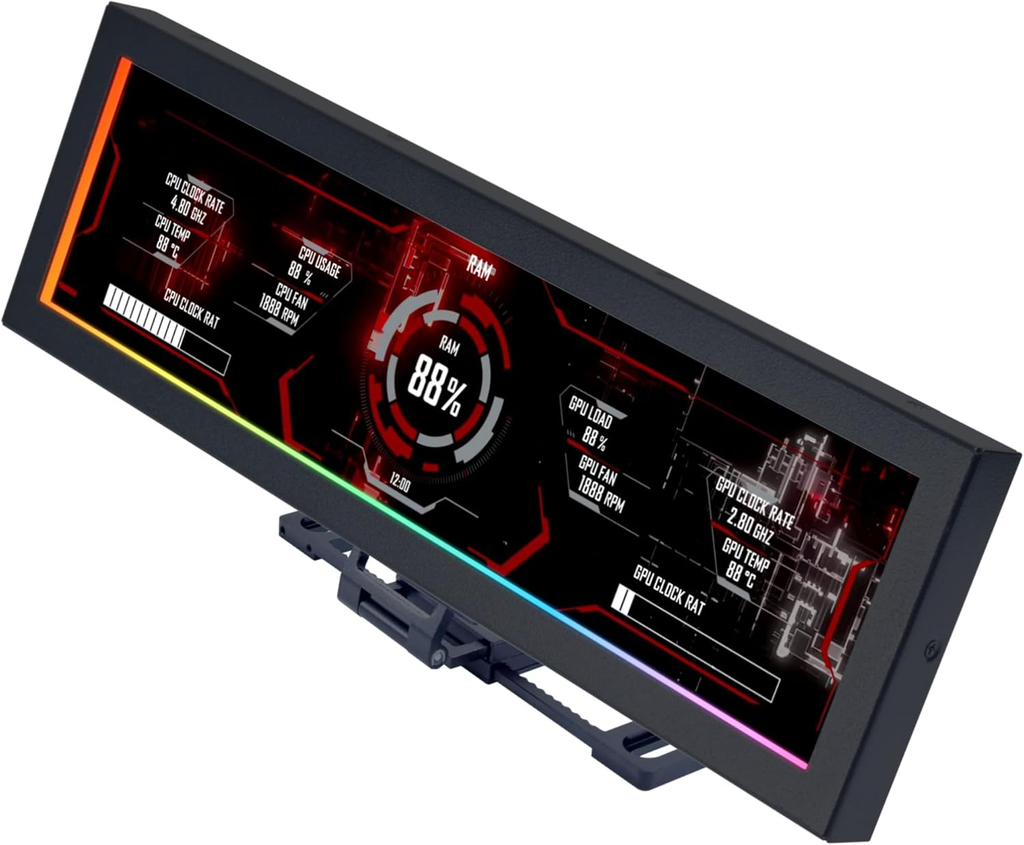
Worth including as the alternative option for readers who don’t actually want to buy a whole new case just to get a screen. This is a standalone 8.8″ IPS display (1920×480, 60Hz, 500 nits) with an ARGB-lit frame that mounts to fan screws, a case panel, or any flat surface via adhesive — so it retrofits onto whatever case someone already owns.
Pros
- Works with any case — mount it externally, internally, wherever it fits. No need to replace a case you already like.
- Connects over USB (9-pin header or USB-A) as a genuine secondary display, not just a proprietary readout — frees up a GPU display port.
- Controlled through Lian Li’s L-Connect 3 software: preset themes, custom images/video, and ARGB lighting sync with the rest of a Lian Li-lit build.
- Flexible mounting bracket with adjustable height and tilt.
Cons
- It’s an add-on, not integrated — expect visible cabling and a bit of DIY mounting work compared to a case with the screen built in.
- USB 2.0 connection, so it’s fine for stats/media but not a high-bandwidth display.
- Best aesthetic payoff is in a Lian Li-heavy build, since ARGB sync depends on L-Connect 3.
This is the practical pick for anyone reading this list and thinking “I like my current case, I just want the screen part.”

I love testing and writing about new tech. I focus on keyboards and controllers. I'm also a gamer and an engineer. Check out my Twitter for keyboard and controller news and reviews.


