


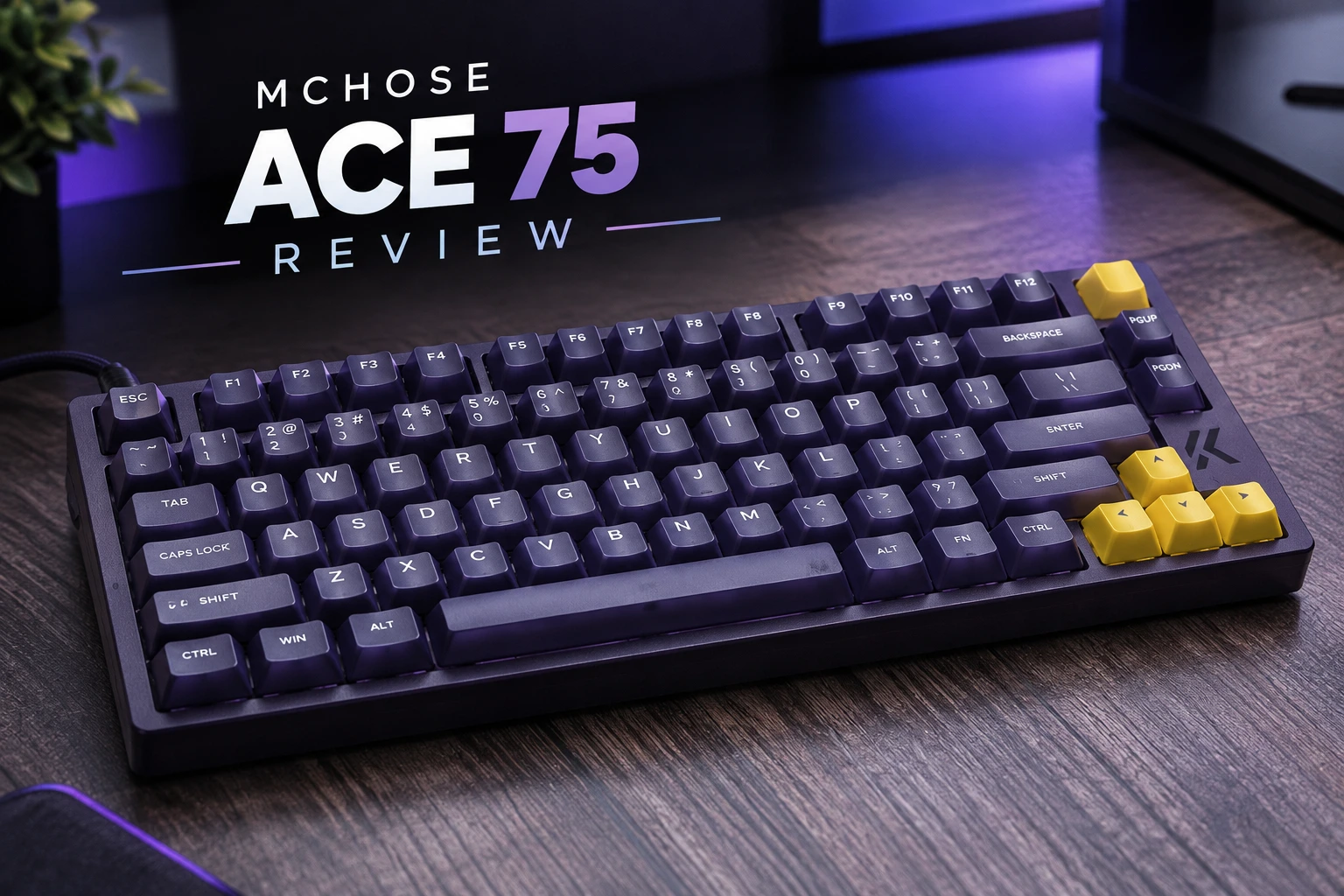
MCHOSE has become one of my go-to brands for Hall Effect keyboards. The ACE 68 GT left a strong impression on me, and the Jet 75 was a fantastic budget keyboard and one of my top recommendations of the year. So when the ACE 75 arrived, bringing the ACE lineup to the 75% layout, my expectations were high.
My unit is the Midnight Purple colorway with Royal Steed magnetic switches. After spending time with it in both games and everyday typing, my verdict is clear: the ACE 75 is a genuinely fast, well-featured keyboard held back by a build that feels too plasticky for its price.
Specifications
| Layout | 75% |
| Colors & Switches | Moon Rock Gray — Berserker Magnetic Switch Mecha Green / Navy Blue / Midnight Purple — Royal Steed Magnetic Switch |
| Keycaps | Opaque PBT (Moon Rock Gray) / Translucent PC (other colors) |
| Hall Effect Platform | MCHOSE fully in-house solution with custom Hall Effect sensors |
| Polling Rate | 8000Hz |
| Scan Rate | 256K |
| Latency | 0.08ms (claimed) |
| Adjustment Precision | 0.001mm |
| Actuation Range | 0.1–3.4mm |
| Rapid Trigger Range | 0.001–3.4mm |
| Advanced Key Functions | RS / SOCD / DKS / MT / TGL / LT |
| Onboard Controls | Side volume knob, dedicated RT button (cycles three onboard Rapid Trigger configurations) |
| Plate | Aluminum positioning plate |
| Acoustic Structure | Sandwich foam, PO switch pad, PET sound-damping pad, bottom foam, silicone bottom pad |
| Lighting | South-facing 16M ARGB, Horizon RGB light bar, Music Rhythm 2.0, Aura Sync |
| Connectivity | Wired only |
| Software | MCHOSE M HUB (Web & Desktop) |
| Dimensions | 322 × 138 × 41mm |
| Weight | ~1,066.5g |
| In the Box | USB cable, function card, 2 spare switches, keycap/switch puller, dust cover, extra keycaps |
| Price | $139 ($109 during the Kickstarter campaign) |
Unboxing

The box contents are fairly standard. Alongside the keyboard, you get a USB cable color-matched to the board (purple, in my case), a function card, two spare Royal Steed switches, a basic keycap and switch puller, and a dust cover. MCHOSE also includes extra keycaps so you can replace the yellow accent keys with ones matching the main colorway. That’s a nice touch, since not everyone will love the yellow-on-purple contrast. The included puller is the usual cheap wire type and is serviceable, but nothing more.
Design and Build Quality

This is where the ACE 75 loses the most points. The case is plastic, and it both looks and feels like it. There’s no creaking, and the board doesn’t flex in any worrying way, but there’s a little give when you try to twist it, and it lacks the dense, premium feel you get from boards in a similar price range. At about 1,066g it isn’t flimsy, but it doesn’t feel substantial either.
Plastic isn’t automatically a problem. On a budget keyboard like the Jet 75, which sells for around $79, compromises are easy to accept. At $139, though, my expectations are higher, and that’s my biggest complaint about the ACE 75. For just $10 more, MCHOSE’s own ACE 68 GT gets an aluminum case, and other keyboards in this price bracket also manage to feel considerably more premium.
Where the ACE 75 redeems itself is in the thoughtful design details. My favorite is the volume knob inlaid into the left side of the case. It has an aluminum feel and clearly defined steps, and it presses in to mute or trigger a custom function. The left side is a great place for a knob, since it’s out of the way during gaming yet easy to reach with your left hand. I’d like to see more manufacturers make use of this space. My only nitpick is that the press is a little less tactile than I’d like.
There’s also a dedicated RT button that cycles through three onboard Rapid Trigger configurations without opening the software. I used it much more than I expected. A small Caps Lock indicator LED sits on the side. Underneath, the feet offer three typing positions: flat plus two raised levels.
As for the layout, 75% remains one of my favorites. You keep the function row and the tilde key, which matters if you play MMOs or regularly open the console in CS2, while still freeing up plenty of room for your mouse.
Keycaps and Lighting

The Midnight Purple, Navy Blue, and Mecha Green versions use translucent PC keycaps, while Moon Rock Gray gets opaque PBT. The PC caps on my unit have a lightly textured surface rather than a slick one, and the legends are slightly raised. Translucent keycaps won’t suit everyone, and they are rarely my first choice either. They do pair well with the lighting, though.
The lighting is one of the ACE 75’s stronger aesthetic points. Alongside south-facing per-key RGB, there’s a Horizon RGB light bar running between the function row and the rest of the keys. It gives the board a distinctive look and helps it stand out from the many 75% boards that rely on per-key lighting alone. The per-key lighting is slightly muted by the keycaps and switch diffusers, but it still comes through well. On the purple case, I found that white lighting looked the cleanest. Music Rhythm 2.0 and Aura Sync are supported for anyone who wants their setup to react to audio or match other RGB components.
Switches and Sound

The ACE 75 comes with one of two linear magnetic switches, depending on the colorway. Both share the same operating force range and 100 million keystroke lifespan, so the difference comes down mostly to character: MCHOSE tunes the Berserker for a fast, crisp feel, and the Royal Steed for a smoother, softer one.
| Berserker | Royal Steed | |
| Colorway | Moon Rock Gray | Mecha Green / Navy Blue / Midnight Purple |
| Type | Linear | Linear |
| Operating Force | 35±8gf | 35±10gf |
| Total Travel | 3.4±0.2mm | 3.45±0.2mm |
| Lifespan | 100M keystrokes | 100M keystrokes |
| Character | Fast, crisp, responsive | Smooth, soft, refined |
| Sound (per MCHOSE) | Crisp bottom-out | Soft, pleasant |
My unit uses the Royal Steed. These switches have clear housings and a thick stem, and travel smoothly from top to bottom. There’s a little more stem wobble at the top than I’d prefer when you hold a bare switch, but once installed on the board they feel stable.
The sound profile is where opinions will split. MCHOSE markets the Royal Steed as having a soft, pleasant sound, but in this keyboard it doesn’t come across that way. With an aluminum plate inside a plastic case, the ACE 75 is a loud, clacky keyboard with a slight hollow edge. The five-layer acoustic structure takes off some of the harshness, and the stabilizers are well tuned, with no rattle on the spacebar or other long keys. Even so, the overall result is bright and noisy rather than muted and thocky. If you like a loud, lively keyboard, you’ll probably enjoy it. If you prefer a deep, dampened sound, this isn’t the board for you, and it isn’t my preference either.
Gaming Performance

Whatever reservations I have about the build, performance is not one of them. The ACE 75 runs on MCHOSE’s own in-house Hall Effect platform with custom sensors, an 8000Hz polling rate, and a 256K scan rate. Actuation can be set from 0.1mm to 3.4mm, and Rapid Trigger from 0.001mm to 3.4mm, all in 0.001mm steps.
In practice, it is extremely responsive. Movement in shooters feels instant, and counter-strafing with Rapid Trigger works exactly as it should. Switching to it felt natural from the very first session, for both gaming and longer typing.
One tip from my testing: with Rapid Trigger 2.0 mode enabled and sensitivity pushed down to 0.001–0.005mm, I got occasional accidental actuations, especially on the spacebar. It’s something I’ve seen on several MCHOSE boards at extreme settings. With Rapid Trigger 2.0 off and a sensitivity of 0.01mm, the keyboard still felt incredibly fast without any misfires.
Keep in mind that running a keyboard at 8000Hz, especially alongside an 8K mouse, adds noticeable CPU load. On a powerful system, that’s not a problem. On a mid-range PC, dropping to 1000Hz or 2000Hz is the smarter choice, and in practice you won’t feel a difference.
MCHOSE M HUB Software
MCHOSE’s M HUB continues to be one of the better driver suites in this category. It’s available as a web app, with a desktop version also offered, and MCHOSE keeps actively updating it.
- Trigger settings: per-key actuation, Rapid Trigger, dead zone adjustment, and Rapid Trigger 2.0 mode. You can type exact values rather than dragging sliders, which some competing drivers still don’t allow.
- Pro player presets: ready-made configurations based on professional players’ setups.
- Advanced keys: Rappy Snappy (RS), SOCD with four trigger conditions, Dynamic Keystroke (DKS), Mod Tap (MT), Toggle (TGL), and Layer Tap (LT).
- Key remapping: full remapping across layers. One of the first things I did was move Delete next to Backspace to match my usual workflow.
- Lighting: plenty of presets with brightness and speed control.
- Profiles: three onboard configurations, which you can cycle with the dedicated RT button.
- Extras: dynamic calibration, anti-mistouch, and firmware updates.
Updating the firmware went smoothly, and I didn’t run into any software issues during testing. If you’ve used other MCHOSE boards, you’ll feel right at home.
Connectivity

The ACE 75 is wired only, with no battery inside. For a performance-focused board that will mostly stay on your desk, I don’t see that as a major drawback, but if you specifically want wireless, look elsewhere. The USB-C port isn’t deeply recessed, so most third-party cables fit without any trouble.
Value

During its Kickstarter campaign, the ACE 75 sold for $109, and at that price it was a good deal: excellent performance, a strong feature set, great software, and some genuinely useful hardware controls. It now sells for $139, and at that price the plastic build and loud sound profile are much harder to overlook, especially when MCHOSE’s own Jet 75 offers similar 8K wired performance for around $79, and the ACE 68 GT adds an aluminum case and 16K polling for $149. For more options, check out our roundup of keyboards with Hall Effect switches.
Pros and Cons
✓ Good
- Excellent gaming performance with 8K polling and a 256K scan rate
- Rapid Trigger and actuation adjustable in 0.001mm steps
- MCHOSE’s in-house Hall Effect platform and custom sensors
- Great side-mounted volume knob
- Dedicated RT button for cycling three onboard configurations
- Distinctive Horizon RGB light bar
- M HUB is feature-rich, actively updated, and lets you enter exact values
- Full advanced key set: RS, SOCD, DKS, MT, TGL, LT
- Practical 75% layout with function row and tilde key
- Three typing positions
- Well-tuned stabilizers
- Extra keycaps and spare switches included
✕ Not So Good
- Plastic build feels underwhelming at $139
- Loud, clacky, slightly hollow sound profile
- Royal Steed switches have some stem wobble at the top
- Knob press could be more tactile
- Very low Rapid Trigger values can cause accidental actuations
- Wired only
- Translucent keycaps won’t suit everyone
- Basic keycap and switch puller
Final Verdict
The MCHOSE ACE 75 is a solid keyboard, just not a fantastic one. Its core strengths are exactly what you’d expect from MCHOSE: fast and reliable Hall Effect performance, excellent software, and smart hardware touches like the side knob and dedicated RT button. As a pure gaming tool, it does everything well.
What holds it back is everything around that performance. The plastic build feels out of place at $139, and the loud, clacky sound profile will appeal only to some users. At the $109 Kickstarter price it was easy to recommend, but at $139 it only makes sense if you specifically want its features and like a lively-sounding keyboard. Otherwise, the Jet 75 remains the better value from MCHOSE, while the ACE 68 GT, with its aluminum case and 16K polling for just $10 more, is the better choice if you want a more premium ACE experience. And if it goes on sale closer to that original $109, it becomes a much stronger pick.
The MCHOSE ACE 75 was provided for the purpose of this review.

I love testing and writing about new tech. I focus on keyboards and controllers. I'm also a gamer and an engineer. Check out my Twitter for keyboard and controller news and reviews.


