




I love mechanical keyboards. The way the keys feel under my fingers, the sound they make, the infinite customisation options with modern keyboards, and how personalised they make your desk setup as a centrepiece. But before we had today’s digital keyboards, we had mechanical typewriters that stamped each letter onto a physical sheet of paper by striking an inked ribbon against it. It’s crazy to me that some of our younger readers may not have ever seen one in their lifetime.
Today, we’re going to be looking at the Epomaker Glyph – a modern keyboard that takes its aesthetic inspiration from typewriters, and has a feature set that makes it relevant to today’s users. Oh, and most importantly, it thocks.
Keyboard Specs
| Epomaker Glyph | |
|---|---|
| Layout | 75% Layout, ANSI US Layout, QWERTY Layout |
| Number of Keys | 83 Keys + 1 Lever + 1 Knob |
| Battery | 8000mAh Battery |
| Connectivity | 2.4GHz / Bluetooth / Wired |
| Compatibility | Mac / Windows /Android / iOS |
| Typing Height | Front – 2.1cm Back – 5.7cm (Actual typing area is flat and at the same height of 2.1cm) |
| Typing Angle | Default – 1 degree With feet – 2 degrees |
| Case Material | ABS Plastic |
| Plate Material | ABS and Aluminium Plate, Non Flex-Cut |
| PCB | Non Flex-cut, Hotswap |
| Stabilizers | Plate-Mounted Stabilizer |
| Mounting Structure | Top Mounted |
| Sound Dampening | 5-Layer Dampening : Noise-Absorbing Foam, Switch Pad, Sound Enhancement Pad, Switch Socket Pad and Bottom Silicone. |
| Keycaps | Round, Flat, Uniform Height, Concave Custom profile PBT Dye Sub keycaps |
| Extras | TFT Screen |
| Polling Rate | Wired : 1000Hz 2.4GHz : 1000Hz Bluetooth : 125Hz |
| Latency | No info provided |
| Software | Epomaker Driver V4 |
| Dimensions | 34.7cm x 20.7cm x 5.7cm |
| Weight | ~1.2kg |
Unboxing & First Impressions
The Epomaker Glyph comes in a larger than expected box. This is because it houses more than just the keyboard. In the box, you’ll find :
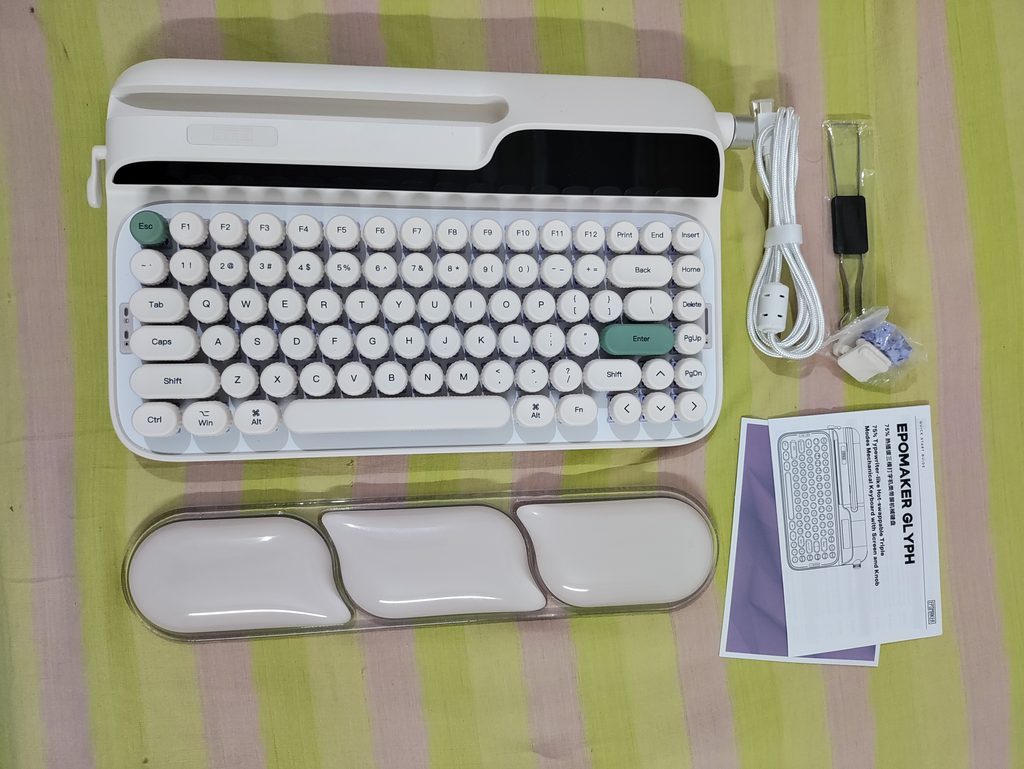
- The Glyph Keyboard, which houses the 2.4GHz wireless dongle underneath
- A plastic Dust Cover
- A silicone Wrist Rest
- 2 extra height adjustment feet
- A USB-A to USB-C cable
- 3 extra switches
- Keycap-Switch puller
- Paperwork – User Manual, Thank-You card
Everything is well protected using foam inside the box.

The Epomaker Glyph is definitely an aesthetic piece of tech. There is only one variant of this keyboard available to purchase – Retro White (it’s more of a beige tbh). This colour suits the typewriter inspired Glyph well. The design here is one of a kind, combining the retro looks of a typewriter with modern keyboard features like a screen and LED indicators. There are very few sharp corners and edges to this keyboard, and everything is rounded and soft. I like it. The side mounted knob and lever are a great touch.
The old school 9009-style accents on the keycaps are perfect for the Glyph, and the round keycaps accentuate the typewriter aesthetic. Epomaker has managed to make the popular 75% layout fit well in this typewriter format. The keycaps are a nice round concave shape which cup your fingertips quite nicely as you type. I don’t know how I feel about the “bottle cap” thing they’ve got going on with the edges of these keycaps. I don’t mind it but… It’s a little weird for sure lol.

The RGB is quite nice and bright. The tail light RGB is bright and well diffused, and it throws its glow onto the bottom of my monitor well.

The Epomaker Wisteria V2 Switches that the Glyph comes with are quite nice. They suit this keyboard well and give it a creamy (vine boom) and thocky (vine boom) typing feel. I’ll talk more about the typing experience in a dedicated section, as there’s some nuances to unpack.
Build Quality
Unlike actual typewriters (at least the ones that I’ve seen), the Glyph’s outer shell is entirely made of ABS plastic. This isn’t a bad thing per se, but I would have preferred a metal body. That would’ve pushed this keyboard’s experience up a notch. I mean it’s not like you’re buying this to put in your backpack or anything. The screen and tablet holder make it much too big to be portable. So a metal body might’ve made this feel more premium. As it stands, the light weight of this keyboard (relative to its size) makes it feel a little toy-ish. It comes in at a weight of about 1.2kg.
The weight, large form factor, and protruding parts on either side render this keyboard unsuitable for carrying in a backpack. Something smaller and lighter would be more suited for that purpose. The Glyph was clearly meant to adorn your desk, and your desk only.
Disassembly is a challenge at best, and impossible without damaging the shell at worst. I only found two screws under the rear feet and that wasn’t enough to open the keyboard. And I don’t think there is a way to isolate the battery to use this keyboard in wired mode exclusively and not worry about battery degradation.
The Screens
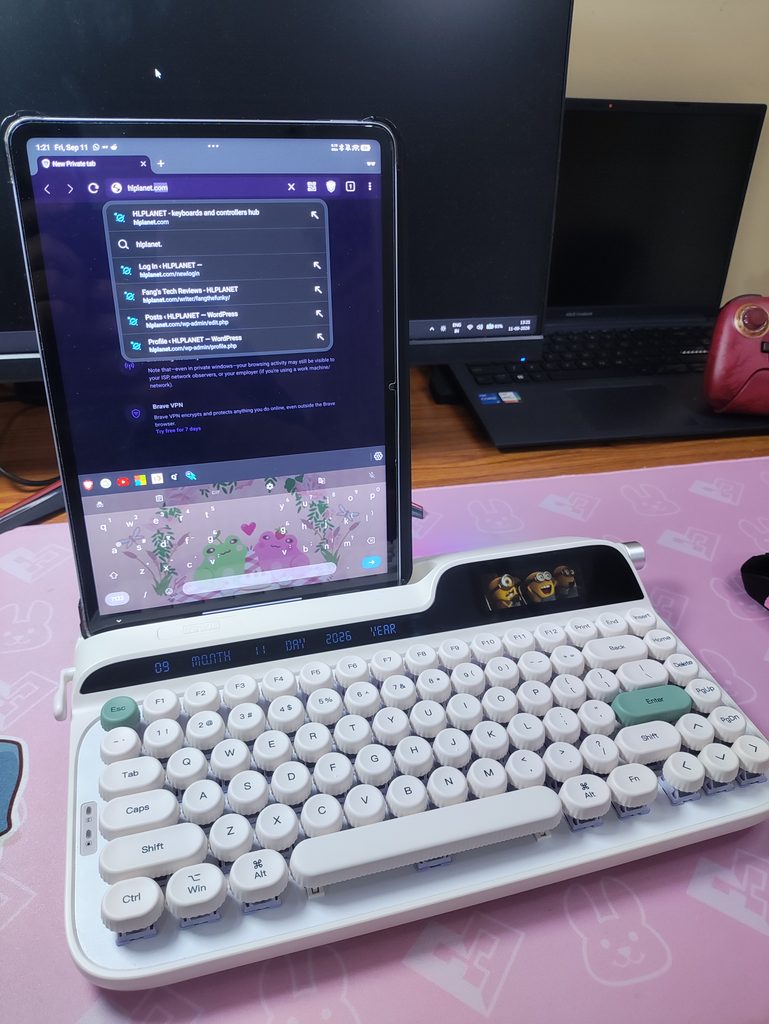
The screen is quite cool looking. Most of the information presented on it is redundant – why would I need to know whether the keyboard interface is in English or Chinese at all times lol. To display actual useful information like CPU temps, you have to run Epomaker’s software with admin permissions and keep it running in the background. That is a no-no. Absolutely not. So for all intents and purposes, that feature might as well not exist. At least you can display custom images, gifs and videos on it.
The “screen” on the left on the other hand just displays the date… why did Epomaker think anyone wants that. They could have made it a dot matrix display that we could customize to display personalized text or designs. Or maybe they could’ve made THIS a clock.

Also, the screens are incredibly vulnerable to scratches. I’ve gotten micro scratches all over the screen from when I was trying to wipe it with a microfiber cloth. It gets scratched with dust and debris.
Typing Experience
The first and foremost thing you notice when you start typing on this keyboard is the ridiculous typing height you have to type at. The keys are about a whole centimeter higher than most other keyboards. This explains why they include the wrist rest in the box. Without it, typing on this keyboard is literally a pain. And that’s with my larger-than-average hands. With the wrist rest though, it’s fairly comfortable. The taller feet configuration increases the typing angle by a single degree, and I felt that the difference was negligible when typing.

The included Wrist Rest is a nice, soft, silicone material and it’s squishy to the touch. It’s pretty comfortable, but after about an hour of gaming, I noticed that my wrist got quite sweaty where it was resting on the wrist rest. Not a big deal, but just something to point out.
Ergonomics aside, the Epomaker Wisteria V2 Linear Switches are quite nice to type on in this keyboard. I did not expect this keyboard to sound as good as it does. It has the standard deep thocky sound signature you get when you stuff a keyboard full of foam. The Glyph has 5 layers of sound dampening materials which give it this sound profile. If you’re not a fan of how these Wisteria V2 switches feel or sound, you can easily swap in other switches of your choice since the Glyph features a hotswappable PCB.

The top mounted structure of this keyboard means there is minimal flex while typing. I don’t hate it. But I like my keyboards to have that gasket bounce at least. The aluminium switch plate also adds to this firmness. The switch foam does mitigate most of the harshness though, so there’s that.
The one weird placement in this keyboard is the delete key. It feels kinda awkward where it is, and I think it should have swapped places with the home key instead. Well that’s not a big deal as you can just remap the buttons and swap the keycaps. The keycaps have a uniform profile after all.
Speaking of keycaps, the ones here are surprisingly nice to type on. The concavity in the middle nestles your fingertips quite well. I’ve had fewer mis-inputs than I thought I would have on this keyboard. Although, the one gripe I have with this keycap set is that I can see the switches in the front row. It takes away from the retro aesthetic and looks half-baked.
You can always swap out these keycaps for something more common like an XDA or MOA profile. OEM and Cherry profile keycaps feel quite weird on this board so I will recommend against using those. The Epomaker x Lindseyszn Azure Dragon SZN Keycap set feels great to use here with their MOA profile, although I would recommend something more beige like a 9009 set instead. The Azure Dragon SZN set is much too bright of a white for this keyboard, and I just used it cuz I happened to have it.
The flicky return lever on the left is an interesting addition. I was quite excited to see it there. When you flick it down, it inputs backspace, and when you flick it up, it inputs enter. This sounds great on paper, but in practice, the lever rebounds and hits the opposite input. I’ve accidentally sent a couple of messages on discord instead of fixing my typo because of this.

This could have been easily fixed if Epomaker let us remap the up and down flick in the software, but they don’t. And this lever is now an unreliable input method. If you press it gently then it works as intended, but… I’ve never seen anyone be gentle with one of these things on a real typewriter lol.
Connection & Latency
The Glyph supports Tri-mode connectivity : 2.4GHz mode, Wired mode, and Bluetooth mode (up to 3 devices). It works on Mac, Windows, Android, and iOS.
The polling rate is 1000Hz on 2.4GHz and wired modes, and 125Hz on Bluetooth mode. It wasn’t listed anywhere on the website, and I only found out this info from the manual. I’ve been playing rhythm games like ADOFAI and osu! to test this and it performs on par with my other gaming keyboards.
Battery Life
The Glyph has an impressive 8000mAh battery capacity. This would last a long time, but with the RGB and screens turned on, it lasted only about 40 hours in my experience. Not too shabby, but nothing spectacular either. I would just use this keyboard wired since it isn’t made to be carried around anyways. But remember that this will degrade the battery over time, so… pick your poison I suppose.
Other things that I like
- I like how the 2.4GHz wireless dongle is stored in the keyboard. It fits snugly in a hidden compartment underneath the keyboard. The magnetically attached metal cover pops off if you press at the indicated part of it and then the dongle is accessible.
- The knob is pleasantly tactile. The tactile bumps match up with the volume changes.
- The tablet/phone holding slot at the top is kinda neat. I’ve actually used it while working to hold my phone and I can easily see any notifications that pop up. And I can switch to one of the bluetooth profiles to chat on my phone without having to pick it up. It’s a handy feature for certain people. I happen to be one of these people.
- I like the battery indicator LED on the right hand side. Perhaps they could’ve saved a little more space by putting that near the screen but it is what it is. It looks nice.

Software Features: Epomaker Driver V4
Epomaker’s software is… fine. It’s pretty clunky and sometimes buggy. The UI isn’t particularly pretty. But it does have all the basic features you would expect from a keyboard software – Macros, remapping, RGB, settings for the display, and firmware updates. Not much more to say here in terms of features.
For the screen to display your CPU temperature, you need to give the Epomaker software admin access, and keep it running in the background. This is a total no bueno for me, as I don’t trust Epomaker’s closed-source software. So I just display gifs instead.
Conclusion
I like the Epomaker Glyph as an aesthetic piece more than a daily driver keyboard. I really wanted to like this keyboard, as it would be a very unique addition to my collection. But the typing height alone makes this keyboard impossible to recommend for me. All other aspects of the typing experience are negated by this lack of ergonomic comfort. It’s a deal breaker for me. Especially at a price like $139, which it retails for. It goes lower during sales, which come often.
Aside from the typing height, the keyboard also has other flaws :
- Proprietary software
- Annoying lever rebound
- Scratch prone screen
- Difficult disassembly
If you’re not a power user and don’t mind these things, this keyboard is quite nice.
- The switches feel and sound great
- It has a very unique design language.
- It offers plenty of modern QOL features like hotswapability and key remapping.
- The included wrist rest fits this keyboard well.

Hello! 🥰 I'm Fang.
I like gaming and related tech. I enjoy learning more, and sharing my experiences through my review videos and blog posts. Have fun! 💖


