

Flydigi has been one of the most innovative and ambitious controller makers in the past few years. And again, they have launched their line-up of controllers for 2026. The Flydigi Apex 5 is their flagship controller for this year, and boy is it good. It has been my main controller ever since I got it, and we’ll see why in this review.
P.S. I didn’t make a review earlier because Flydigi has somewhat of a history regarding questionable quality control. So I wanted to make sure that there weren’t any issues with my unit.
PACKAGING
The Apex 5 comes in a pretty large box. The packaging is great and the presentation feels quite premium. There’s a note from the chief designer in the box, which is a nice touch. In the box, you get –

- Flydigi Apex 5 controller
- A braided USB-A to USB-C cable
- A 2.4gHz wireless adapter
- 2 attachable plastic back paddles
- A used manual
- Additional plates for custom design on the RGB handle logo slot
- Promo brochure
I also got the separately purchasable charging dock pro 2.
SPEC SHEET
From Flydigi website and my own observations
- Layout: Xbox
- Connectivity: Wired, Bluetooth, 2.4GHz
- Compatibility: PC, Android, iOS, Switch, Mac
- Sticks: Hall Effect
- Triggers: Hall Effect with motorised simulated trigger stops
- Extra Buttons: 4 rear paddles, 2 extra bumpers
- Battery: 1500mAh
- Polling Rate: 1000Hz in wired & 2.4gHz mode, 125Hz in bluetooth mode
- Colors: White, multiple special collaboration editions
- Software: PC and Mobile apps
- Price: $160 base, accessories and special editions cost more
BUILD & APPEARANCE

The Apex 5 looks really cool. It has a futuristic vibe, and looks well thought out. All the bits and bobs mesh well together. The RGB is well implemented as well, unlike most other controllers in the market. In this generation of the controller, Flydigi has added a light bar at the bottom of the controller, which highlights the shape and contours of the Apex 5. I’m a fan. All the RGB is fully customizable as well!

There are a good number of “Limited edition” variants of the Apex 5 as well, which all look incredibly cool IMO. They cost more and come with some extra accessories usually.
The Apex 5 is also built really well. It features a magnetically attached, transparent, somewhat frosted faceplate at the front. This has a grippy handfeel. It’s not matte or textured, but the material used prevents smudges and fingerprints from your hand while simultaneously dispersing glare and reflections. Great job here Flydigi.
The screen is nested in a triangle at the top, and this one does get some visible fingerprints on it, which is a shame. It’s not a dealbreaker by any means of course. It just means that I have to wipe my controller every so often.

In the Apex 4, we had blue translucent triggers. This time, we have transparent triggers but with a blue inner section. This gives it a really snazzy and smart look. Combined with the way the bumpers and the extra bumpers look, this top face of this controller is quite the looker.

On the back, we see a grey textured rubber grip. The texture this time is improved from the last generation, which was already quite good. The Apex 5 pretty much sticks to your hands and it’s very grippy. It feels excellent in the hand. The back buttons and paddles look a little stubby in my opinion, but the back of your controller is usually not in view XD. There’s also the pins for the charging dock here, and right above is the ON/OFF switch.

We also see this little removable section at the top of the back side. This is likely for a phone mount.


All in all, the Flydigi Apex 5 is built like a TANK and it’s the best looking controller in the market right now in my opinion.
I do have a couple of gripes about this controller though. First is the weight. Sitting at a whopping 345 grams, the Apex 5 feels quite heavy in the hands. I have adapted to resting my wrists on my lap or on the desk to accommodate for the heft of the Apex 5, but you might find this weight quite uncomfortable if you aren’t a big ol’ strong man with large hands like me.

The other minor nitpick I have with the Apex 5 is the grey rubber they have used for the thumb-grips and the back grips. They used this same material with the Apex 4, and it gets a little dirty looking over time. It doesn’t wear out or lose it’s grip, but the grey gets darker and a little yellow after using for a few months. I’ve been using external thumb-grips on the Apex 5 since the beginning so I won’t have this issue, but the grips will inevitably get affected. Minor issue though.
> The Screen

One of the flagship features of the Flydigi Apex 5 is the screen. It’s a 150Hz LCD panel that you can customize with gifs, images, and a few animations that are available in the Flydigi Space Station 4.0 software.
Aside from being eye-candy, the screen is actually quite useful too. You can basically control and customize all basic features of the controller with the screen without needing to adjust it in the software. This is quite handy. Most controllers don’t let you do this. You will still need the software for granular control like adjusting deadzones or changing stick curves, but most things that you would need to change on the fly, you can with the screen.
ANALOG STICKS

The Apex 5 features a similar stick mechanism to the Apex 4 from last year. This time, it comes with improved durability in mind (as there were a significant number of issues in this regard with the Apex 4). The dual rail system provides a smoothness and feel unique to the Flydigi’s controllers. This mechanism also has a funky snap back (in a good way) that feels very “in-control” when you’re gaming with the sticks.
The anti-friction rings are excellent and even after many months of heavy use, it remains smooth.
The tension adjustment is an awesome feature that Flydigi has implemented in 2 generations of controllers now, with minor improvements each time and even in their budget controller Direwolf 4. The process to adjust the tension is a tad cumbersome, but it’s not something you would do often. It’s more of a set it once and forget about it situation.
At lower tensions, there is a tiny bit of snap-back. This isn’t an issue, it’s just what happens with centering the stick at such a low tension.
To change the tension, you take the faceplate off (it’s held on by magnets, so this isn’t difficult), then you use the tool under the faceplate to turn the screw clockwise for higher tension and counter-clockwise for lower tension. On the Apex 5, the tension you can set ranges from 30gf to 100gf. For reference, the tension on a standard current gen X-box controller is about 65gf.


The sticks themselves are pretty much perfect in my opinion. Accuracy is great and I’ve had no issues.
ABXY BUTTONS

The Apex 5 uses mechanical micro switches for the face buttons as well as the menu buttons. The ABXY face buttons feel great and super responsive. There’s minimal wobble and the tactility is great too. There’s a little bit of pre-travel which adds to the bounciness of the buttons. The buttons aren’t too tight or too light, so there are practically zero accidental presses or misinputs. They sound light and clicky, without being super loud. I like em.
The buttons aren’t removable, so you’re stuck with the X-box layout ABXY and can’t swap to the switch layout BAYX. But you can change it in the software, it just won’t show as the proper button physically. So in Switch mode, pressing the A button on the controller will input B and pressing B will input A. I haven’t found this to be an issue at all.
D-PAD

After years of using a circular D-pad, which is also quite to my liking, Flydigi has opted for a new Diamond shaped D-pad. They’ve also changed the feel and mechanism of the D-pad. I’m a big fan of the D-pad here. It feels bouncy, tactile and responsive. The feedback is excellent. It’s a tad less clicky than the last gen circular D-pad, and that’s an improvement IMO.
The D-pad on the previous gen Flydigi controllers had a lackluster central pivot. But Flydigi has addressed this issue with the new D-pad, and they’ve fixed this issue. The D-pad has very little, almost nil wobble.
The diagonals are also easy to press and accurate with no misinputs in my months of usage. Since the d-pad uses microswitches, the feedback when activating a diagonal input is impossible to miss.
There are also separate D-pad styles available to purchase separately. (at this exorbitant price, these should have just been included imo)
SHOULDER BUMPERS

The bumpers feel nice. They’re mechanical and feel quite light. They’re excellent to press at all points on the bumper. The textured plastic grip also help.
There’s also an extra pair of L4 and R4 bumpers which can be mapped to whatever you like in the Space Station software. I mapped the R4 bumper to toggle gyro control.
TRIGGERS – The Star of the Show

The flagship feature of the Apex series of controllers by Flydigi is the adaptive triggers. We’ll get to this in a minute, let me tell you about what the trigger itself feels like before we get to this feature.
The triggers feel great. They’re made of transparent plastic which I assume is polycarbonate. Feels nice to the touch. The textured surface of the trigger helps with the grip too.
There’s pretty much zero inner and outer dead-zone when you set the setting to zero. You can set as much dead-zone as you need in the software. This is excellent for precise games like racing games. It’s super smooth to press and the tension is perfect imo.
> Adaptive Triggers
Now, let’s talk about the signature feature of the Apex 5, the adaptive triggers.
Flydigi has developed their own tech to mimic the adaptive triggers from PS5’s Dualsense controllers. In some games, it even feels better than the Dualsense controller.
A short explanation on what adaptive triggers are – they’re different from just simple trigger vibrations that you find in Impulse triggers on Xbox controllers. Adaptive triggers actively change the pressure under your finger and the vibration intensity. For example, in Forza horizon 5, you can feel the texture of the road that you’re driving on because of the adaptive triggers behaving differently on dirt surfaces and asphalt. You are also able to tell when your tires are about to lose grip. It’s quite difficult to explain in words. It’s an experience you should… well, experience.
To use this feature, you need to enable it on a per-game basis on the Flydigi Space Station 4.0 app. It’s just a simple button you have to click on in the software. Most of the games have presets made by Flydigi, and for some Sony games you can use the controller in “Dualsense” mode which uses the actual Dualsense outputs and translates it.
In case you want just trigger vibrations instead of adaptive triggers for some reason, then you have that option in the software as well. You can even tie the trigger vibration to the controller rumble if you want.
> Trigger Stops
The Apex 5 doesn’t have a trigger lock toggle slider like a lot of other controllers. In other controllers, engaging the trigger locks converts the trigger input from an analog lever to a digital, mouse click. In the Apex 5, we have software trigger locks instead. What this does is that it sets the motor in the trigger to maximum strength at your desired point on its path. This simulates a trigger stop mechanism. The input is digital at this point too.
If you squeeze hard enough, you can power through this stop and push the trigger down. But this requires deliberate effort and I personally haven’t done this ever unless it was on purpose.
But yeah, proper trigger locks definitely feel better than this mechanism. But it’s a trade-off I’d make any day. Adaptive triggers are too good of a feature in my use case to prefer trigger stops.
BACK BUTTONS

The Apex 5 features 2 permanent back buttons, and 2 detachable paddles that come included in the box. These are all mechanical buttons and they feel great to use. They’re fully remappable in the software as well.
I like the new back paddle design. Overall, they feel great and are placed in very comfortable, natural position. The detachable paddles are great too because you can use the 2+2 button layout if you want (2 back buttons + 2 extra shoulder bumpers)
So all in all, you get 6 remappable extra buttons on the Flydigi Apex 5
SOUND TEST
HAPTICS
The controller rumble feels great. It has an asymmetric motor system, and you can even see the motors rumbling because the front section is transparent. Fun.
Since this controller is so heavy, the rumble does feel a little dulled due to the inertia of the controller. But it is still very detailed and crisp feeling.
Combined with the trigger haptics mentioned before, the Apex 5 presents a very satisfactory haptic experience.
GYROSCOPE
The gyro is… there. While it IS mappable to the sticks and a mouse input, the gyro has a decent amount of jitter which is a bad thing for use cases where precision and speed are required, like FPS games.
The gyro is great for Nintendo Switch games though, so if that’s what you’re going to use it for, don’t consider this a deal-breaker.
BATTERY LIFE
The Apex 5 has a 1500mAh battery. Most controllers have 1000mAh or less, so 1500mAh might sound like a lot. But the truth is… it is. Hah gotcha. It lasts like 20-30 hours depending on how much vibration and RGB you’re using. That’s quite a long use time for a controller like this.
The separately purchasable Charging Dock 2 Pro is quite a nice addition. I haven’t had to think about charging my controller in weeks now, because the dock handles all that. The RGB on the dock looks great. But the dock is quite bulky, and I would have taken a simpler, less bulky dock over this RGB laden chunk of space lol.
CONNECTIVITY & such
The Apex 5 is a tri-mode controller, and it works in 2.4gHz mode, Bluetooth, and wired modes.
It’s compatible with windows, Nintendo Switch, Android, iOS and MacOS.
The latency numbers are excellent. The best in the market even. The button and stick latency are about 3ms in wired x-input mode, and about 5ms with the 2.4gHz dongle wireless mode. These numbers are at 1000Hz polling rate.
In the Nintendo switch Bluetooth mode, the controller works at a measly 100Hz. But that’s not Flydigi’s fault. That’s just how Switch mode is in every controller. It works well enough, and the 25ms or so of latency isn’t a bother at the 60Hz refresh rate that the Nintendo switch has.

SOFTWARE – Space Station 4.0
It’s an excellent software that lets you adjust practically everything about your controller. It’s super granular and I’ve been having a blast using this software.
I’ll list out some of the customizations that stood out to me –
- Remap all buttons on the Apex 5 to controller buttons, macros or even keyboard buttons and combos
- Turbo (aka continuous trigger)
- Adjusting Stick curves, adjusting deadzones, choosing between a circular or rectangular stick. Customizable per stick individually
- Customizing RGB
- Customizing the screen
- Customize the charging dock’s animations and stuff
- Customizing Gyro
- Customizing various trigger vibration modes and intensity etc.
- Adaptive trigger adjustments
- Automatic stick recalibration when the stick is centered
- Changing stick resolution from 8bit to 12bit
- Firmware updates
There’s more but these are the features I’ve used the most.


ACCESSORIES

There a good number of separately purchasable accessories for the Flydigi Apex 5
- Charging Dock Pro 2
- Elite Accessory pack (carrying case + D-Pads + Joysticks)
- Clip-on Phone Holder
- Interchangeable Joystick set (different heights and shapes)
- Interchangeable D-Pad sets
- Blade style back paddles
There’s also a lot of third party accessories like 3d printed back paddles and D-Pads, screen protectors, Grip tapes, etc.
CONCLUDING THOUGHTS
There’s a lot to like about this controller, as you would have seen in the review. In fact it’s too much to list here, so I’ll skip that and just list out the things that I would have preferred to see instead.
Where it could be better?
- It’s quite heavy. I would like to see it be a little lighter if possible.
- The lack of physical trigger stops is a major con of the Apex 5, and I would highly recommend Flydigi to figure out a way to add this to the Apex 6
- The back paddles should have been made of aluminium. Plastic paddles raise a durability concern in my mind.
- Software can be finicky with certain anti-cheats
This is a powerhouse of a controller – the best of the best. And boy does the price tag reflect this. At $160, you could probably buy 2 or 3 flagship controllers from other brands. But the price IS justified in my opinion. The adaptive triggers, adjustable tension sticks, the screen, etc. make it a unique controller like no other, and, in a way justifies the price tag.
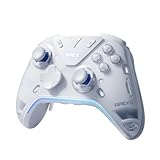
- Flydigi apex 5 pc controller work across multiple platforms: PC/NS/TV/Android/Laptop (NOT Support Xbox/PS)
I definitely recommend this to anyone looking for a high-performance, eye-catching controller with PS5-style trigger features. It takes a lot of experimental tech and puts it into a package that actually works for a premium experience without feeling gimmicky.
Flydigi
Apex 5

If the $160 price is too much for you though, do consider the Flydigi Vader 5 Pro. It comes in at about half the price, but packs a lot of features and performance.

Hello! 🥰 I'm Fang.
I like gaming and related tech. I enjoy learning more, and sharing my experiences through my review videos and blog posts. Have fun! 💖