


I spent last two weeks testing the IQUNIX Magi75, which does not include the side module with the knob or multimedia buttons which is in the Magi75 Pro version. It probably makes the most sense in terms of pricing: it’s around $140. My goal was to see how this version performs for daily typing, coding, and general productivity over these two weeks.
Design and Build Quality

The IQUNIX Magi75 shares the same clean, minimal aluminum design as the Pro model. There are two color options, black and white and I got the white one, which looks quite interesting. In use, I found the low-profile 11 mm case visually sleek and comfortable. The keyboard feels extremely solid, with virtually no flex, giving a premium impression when typing.

The weight is noticeable – 977 g – but without the Pro side module, it’s easier to find a comfortable spot on my desk. The fixed 4° typing angle worked fine during long typing sessions, though I still would have preferred adjustable feet. Rubber bumpers keep it from sliding around.
Layout and Daily Use

The 75% layout is perfect for me. I had access to the full function row, navigation keys, and Page Up/Down keys without needing to learn awkward combinations. I tested it for coding, writing, and multitasking between applications, and the layout felt intuitive and practical.
The ANSI layout I tested was simple to get used to. Switching between macOS and Windows modes via function + tab was seamless, though I would have preferred a physical switch.
Keycaps

The PBT keycaps are excellent. I typed for hours and didn’t notice any shine developing. The spherical concave shape cradled my fingertips naturally, and the triple-dot homing markers on F and J keys were easy to adapt to.
Gold Red switches

The keyboard uses Kailh low-profile Gold Red linear switches. I don’t know why they are called red as they are clearly white. They are smooth, light, and fast. During typing tests, I noticed a speed increase compared to my previous full-height boards. The shorter travel takes some getting used to, but it allows for a responsive and fluid typing experience.
| Feature | Gold Red Switch |
|---|---|
| Operating Force | 40 + 10 gf |
| Pre-Travel | 1.2 ± 0.30 mm |
| Total Travel | 2.8 ± 0.25 mm |
| Switch Type | Linear |
| Lifespan | 50 million actuations |
I appreciated the hot-swappable design. I didn’t change switches myself, but knowing I could swap them without soldering adds long-term flexibility if you decide to get into this hobby more.
Typing Sound and Feel

Typing on the Magi75 is solid and controlled. The gasket mount absorbs bottom-out impact just enough to reduce harshness. The sound is quieter than expected for an aluminum board, but there is still a slight metallic ping in some keys, though less noticeable than on the larger Pro units I tested previously.
I found it comfortable for extended sessions. It’s not completely silent, but it’s unobtrusive in a home office environment.
Connectivity and Battery

I tested Bluetooth 5.1 across three devices, the 2.4 GHz wireless, and wired USB-C mode. All were stable. Switching between devices worked without issues, and latency was negligible for casual gaming and typing.
Battery life was strong. I got several days of use on Bluetooth with backlighting off. With RGB on, the battery lasted roughly a standard workday. The absence of the knob and Pro lights slightly improves battery longevity.
Accessories

The included travel case is practical, especially if you want to take the keyboard on the go. The coiled USB-A to USB-C cable is flexible and high-quality, and the extra keycaps and switch puller are useful. The USB receiver and adapter are thoughtful additions. I wish it had extra switches, but the quality of there accessories is nice.
Pros and cons

Pros:
- Premium feeling
- Good keycaps and switches
- Low profile 75% layout done right
- ANSI and ISO layouts available
- Travel case
Cons:
- No adjustable feet
- Single switch option
TLDR
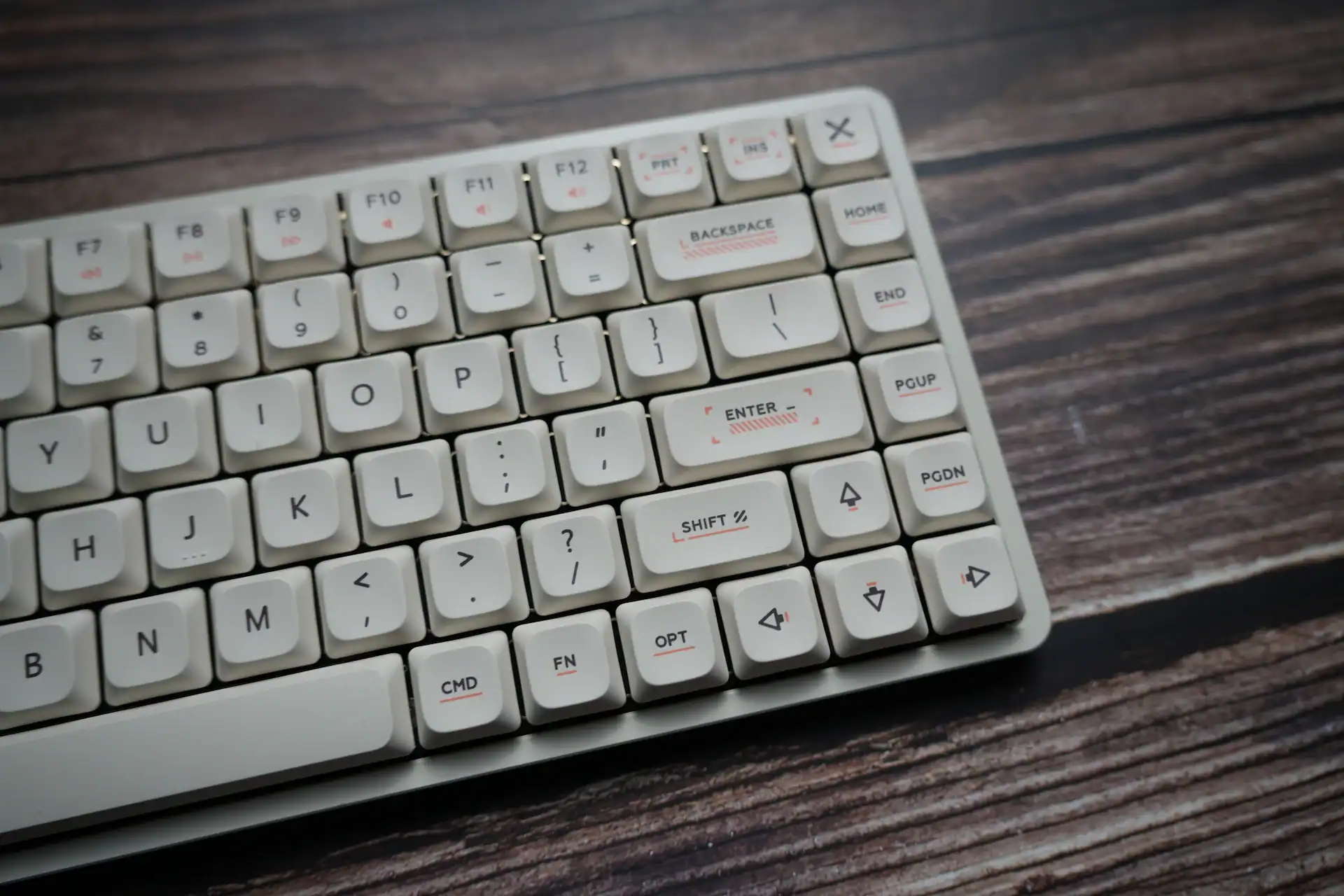
After testing the IQUNIX Magi75, I can confidently say it’s an excellent low-profile 75% keyboard if you don’t need the extra knob or multimedia buttons. If you do then there’s the IQUNIX Magi75 Pro with these. The build quality, keycaps, and layout are superb, and it’s comfortable for extended typing sessions. For users prioritizing a minimalist desk setup or looking for a solid, portable 75% board, this version hits the sweet spot.
You can buy IQUNIX Magi75 on these storefronts:
- Amazon.com – $159.99
- Iqunix.com – $139 + shipping
You can use our coupon code HLPLANET for 5% on IQUNIX official store.

I love testing and writing about new tech. I focus on keyboards and controllers. I'm also a gamer and an engineer. Check out my Twitter for keyboard and controller news and reviews.


