Today, I have a particularly interesting keyboard on my desk – the Hex80. This Hall Effect keyboard was co-developed by two well-known brands: ATK Gear, a company best known for its performance-oriented gaming peripherals, and QwertyKeys, a name that has earned a strong reputation among keyboard enthusiasts for its exceptional craftsmanship and attention to detail.
The idea of pairing ATK’s focus on competitive gaming performance with QwertyKeys’ experience in designing premium custom keyboards sounds genuinely promising. So, let’s take a closer look. There’s certainly a lot to talk about.
Unboxing: What’s Inside?

Right from the unboxing, the Hex80 gives off strong custom keyboard vibes. It arrives in a large cardboard package, and lifting the lid reveals a hard-shell carrying case with the HEX80 logo printed on top.
The carrying case itself is well made and does an excellent job of protecting the keyboard. Inside, the Hex80 is held securely in place by a pair of retention straps and covered by a protective divider. There’s also a dedicated compartment for the included accessories, keeping everything neatly organized and easy to find.

Personally, I’m always happy to see manufacturers include a carrying case. It not only makes the unboxing feel more premium but is also genuinely practical if you ever need to transport or store the keyboard.

Inside the carrying case, you’ll find the following:
- Hex80 Keyboard
- Braided USB-C to USB-A Cable
- Basic 2-in-1 Keycap and Switch Puller
- Push-Button 2-in-1 Keycap and Switch Puller
- 4 Spare Owlab Ti Switches
- Dust Cover
- Quick Start Guide
- Manual
- Quality Control Card
- Safety Information Card
- Warranty Card
Interestingly, the accessory bundle includes two different 2-in-1 keycap and switch pullers. Alongside the classic one, you also get the newer 4-claw version, giving you the choice between the two. I definitely didn’t expect to find two different pullers, but it’s nice to have the choice. Including a more enthusiast-grade push-button puller only further reinforces that custom keyboard feel.

Another nice addition is that the bundle includes four spare switches. Since magnetic switches don’t suffer from issues like double-clicking, more and more manufacturers have stopped including spare switches in the box. Unfortunately, that doesn’t mean they can never be damaged. Accidents can still happen, especially if you like opening switches for lubrication or other modifications. Having a few replacements on hand means you don’t have to worry if one gets physically damaged, so I’m glad to see them included here.
As for the included cable, it’s a high-quality braided cable with sturdy connectors and a ferrite bead to help reduce interference. It has an interesting look and doesn’t feel like a generic cable you usually find bundled with keyboards. It is fairly stiff, which may not appeal to everyone, but for a keyboard, this is nowhere near as important as it would be for a mouse, especially considering the weight of the aluminum case that keeps the keyboard firmly in place. One thing worth mentioning is that the included cable is the same gray color with orange accents regardless of which Hex80 colorway you choose. Personally, I would have liked to see a color-matched cable to better complement each color variant.

Finally, the Hex80 also comes with a dust cover. It’s a small accessory, but one I consider an essential part of any keyboard package, so I’m always happy to see one included. It helps keep dust off the switches and keycaps between uses and simply makes the keyboard easier to keep clean.
Overall, I’m very pleased with the included accessories. They are not just basic items thrown into the box – the whole selection feels well thought out and well made, complementing the keyboard nicely.
First Look
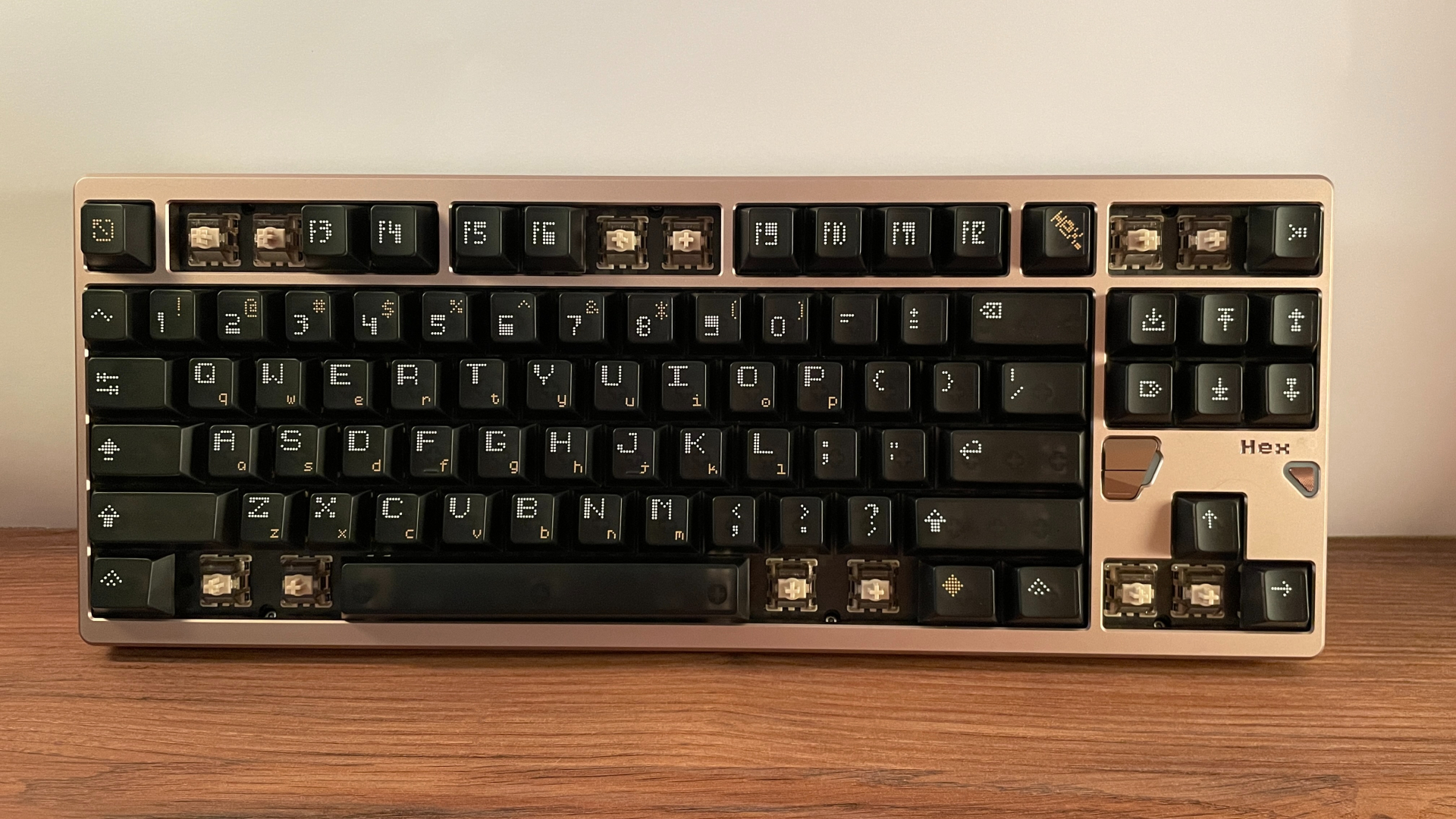
The Hex80 is an 80% (TKL) Hall Effect keyboard featuring 88 keys in an ANSI layout, along with three additional buttons located below the navigation cluster. It comes with a fixed 7-degree typing angle.

The keyboard has a CNC-machined case made from 6063-T6 aluminum. This alloy is known for its good balance of strength and corrosion resistance. Of course, for those who appreciate aluminum keyboards, the appeal goes beyond the material itself and comes from the details and craftsmanship behind the construction.
And this is where the Hex80 absolutely shines. Instead of using a simple two-part design, it features a much more complex ten-piece aluminum case, yet there isn’t a single visible screw anywhere on the outside. All of the screws are completely hidden, giving the keyboard a much cleaner and more seamless appearance.

At 1.7 kg, the Hex80 is noticeably heavy. It feels incredibly solid in the hands. There is absolutely no creaking, flex, or any inconsistencies in the fit between the individual parts. The machining quality is equally impressive, with precisely machined beveled edges, tight tolerances, and no visible imperfections on my keyboard.
The aluminum case features a 220-mesh surface finish that gives it a fine, uniform texture, and I really like how smooth and pleasant it feels to the touch. The anodization is equally well executed, with a perfectly even finish free from discoloration or any other visible inconsistencies.
After CNC machining, aluminum surfaces can have subtle tool marks, fine scratches, or slight variations in texture. Before the final coating is applied – whether that’s anodizing, electrophoretic coating (E-coating), spray coating or powder coating – the surface needs to be properly prepared to remove any imperfections that may be present.
This is where sandblasting comes in. The aluminum is blasted with fine abrasive particles under pressure, creating a uniform matte texture while also removing minor machining marks and scratches. Besides improving the appearance, sandblasting also creates microscopic surface roughness that helps the final coating adhere more evenly, reducing the risk of blotches or inconsistencies.
The mesh rating (also commonly called grit) refers to the size of the abrasive particles used during this process. In the mechanical keyboard world, aluminum cases are most commonly finished using 150-, 180-, or 220-mesh surface treatments. This number is important because the higher the mesh, the finer the abrasive particles. A finer abrasive creates a smoother surface, resulting in a more refined, silkier feel to the touch. It also tends to be a more expensive manufacturing process, which is one of the reasons why higher-mesh finishes are more commonly found on premium aluminum keyboards.
Despite the complexity of the construction – a ten-piece aluminum case combined with a hidden screw design is definitely not the easiest approach from a manufacturing perspective – QwertyKeys managed to execute it extremely well, with the final result feeling virtually flawless. To be honest, I wouldn’t have expected anything less from QwertyKeys.

From a design perspective, the Hex80 strikes a great balance between minimalism and character. The case itself has a clean and understated design, but the more playful keycaps help soften the otherwise serious overall look of the keyboard. (Of course, if you prefer a more minimal appearance, you can always swap the keycaps.)
Looking closer, the first thing that catches the eye is the area below the navigation cluster, featuring three uniquely styled additional buttons, two RGB light elements, and the subtle “Hex80” branding. I particularly like the way these additional buttons are integrated into the design – they not only add useful functionality but also serve as a distinctive visual accent.
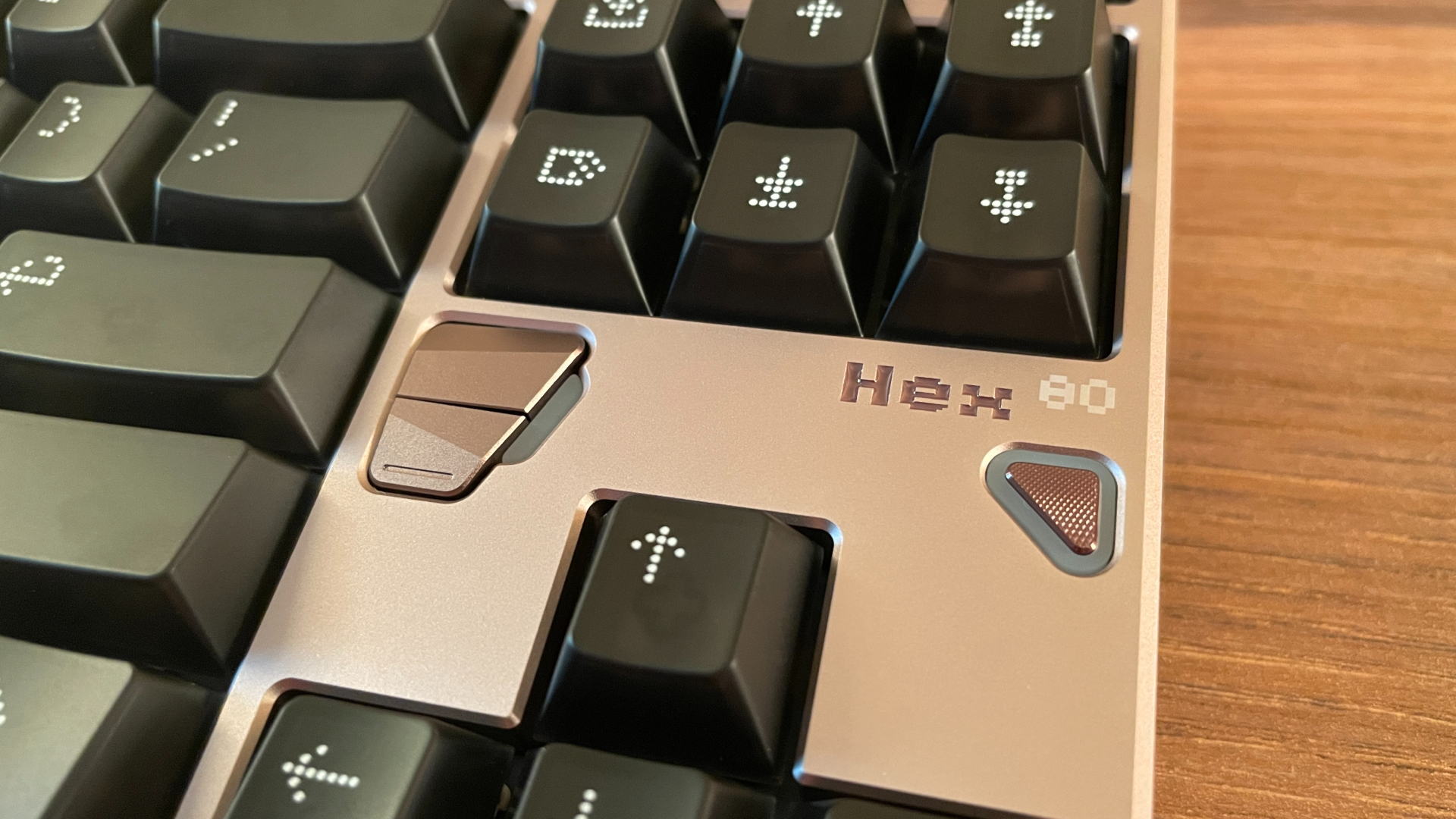
The two buttons on the left control the keyboard’s two independent lighting zones. The upper button cycles through effects for the main keyboard backlighting, while the lower one controls the RGB elements placed next to these additional buttons. The third button, positioned on the right, cycles through the onboard profiles. Having a dedicated button for quickly switching between profiles is genuinely convenient during everyday use, especially if you regularly switch between work and gaming configurations. Unfortunately, these buttons cannot be reassigned to other functions through the software, which is something I would have liked to see.
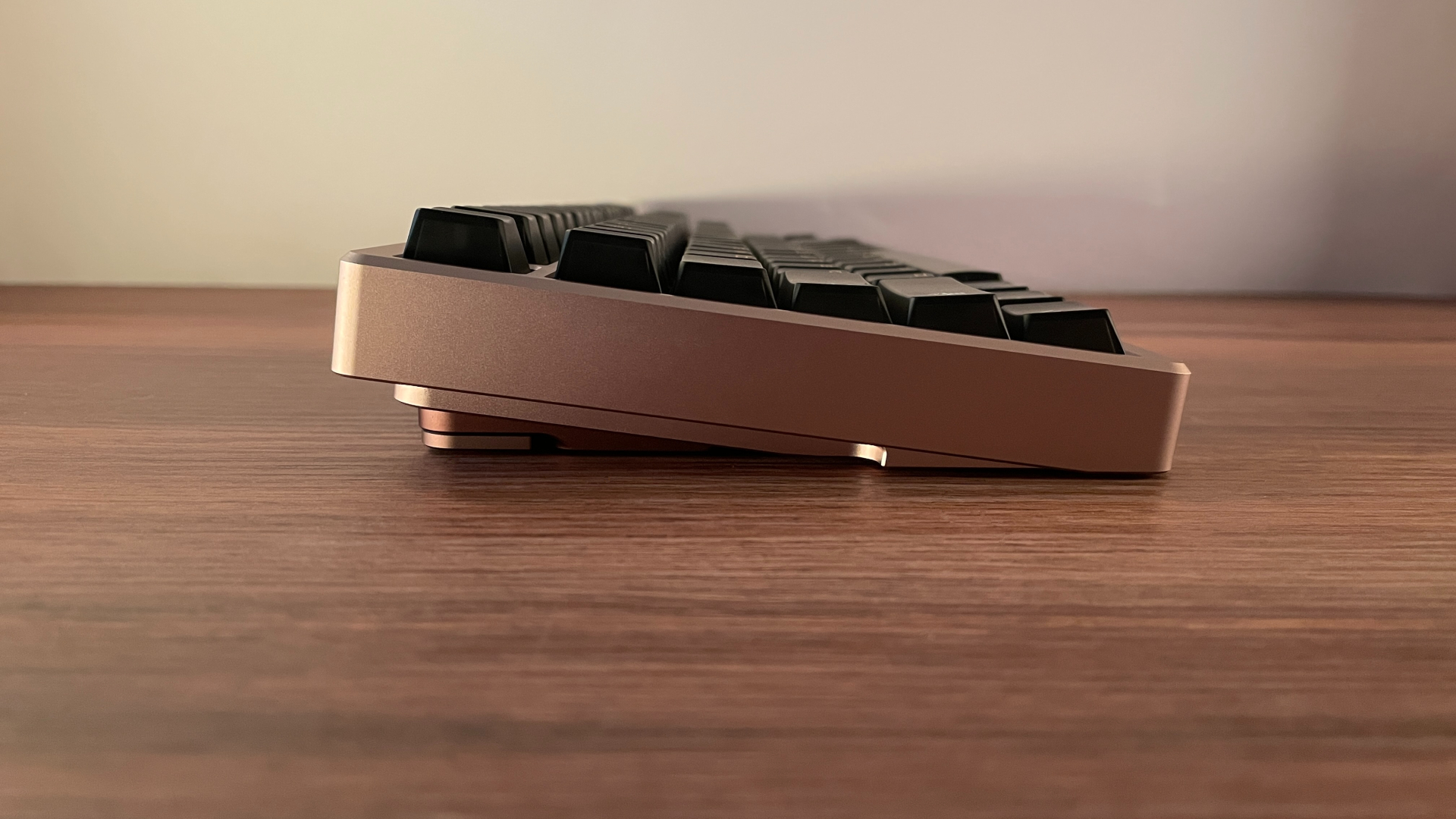
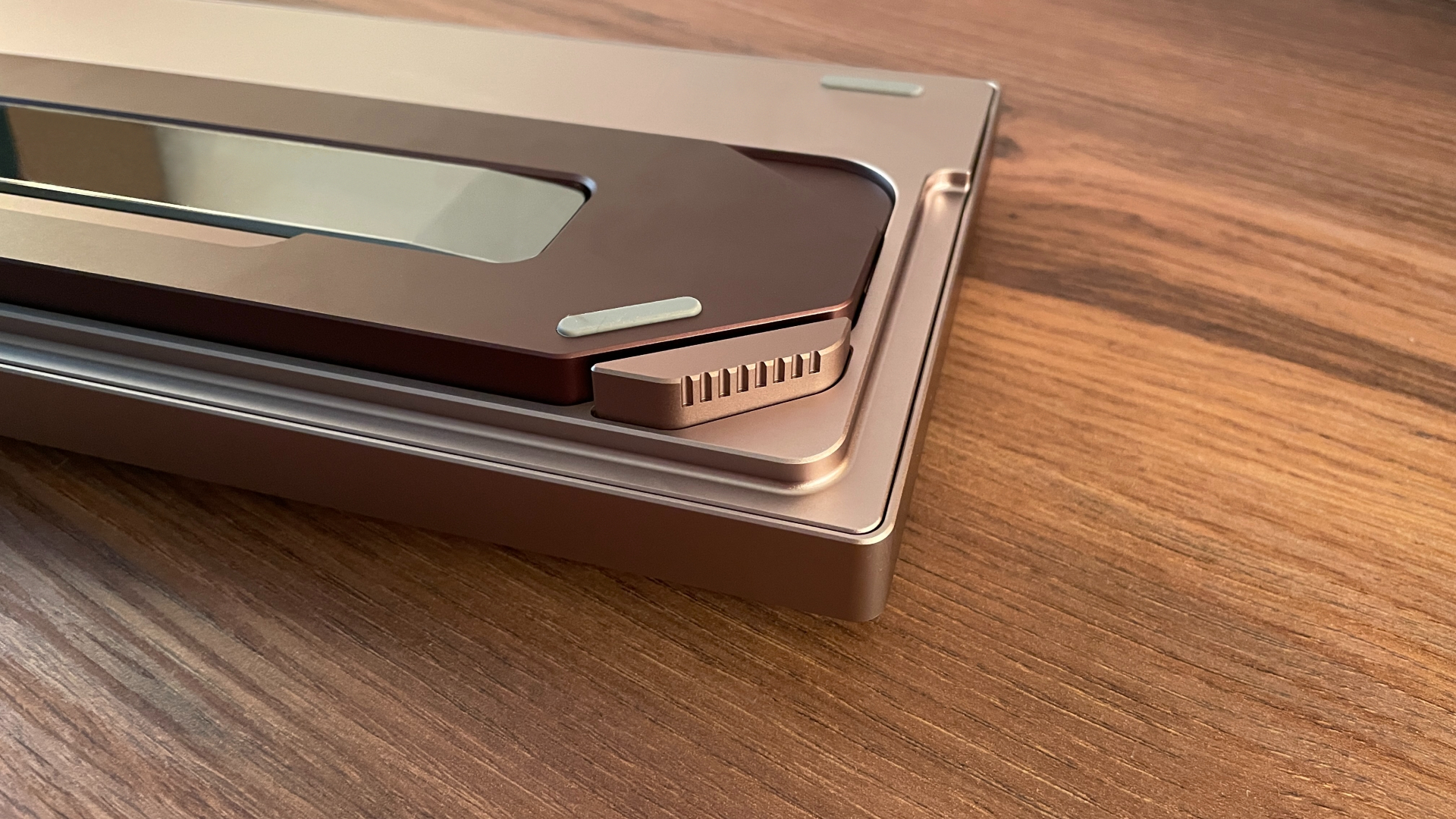
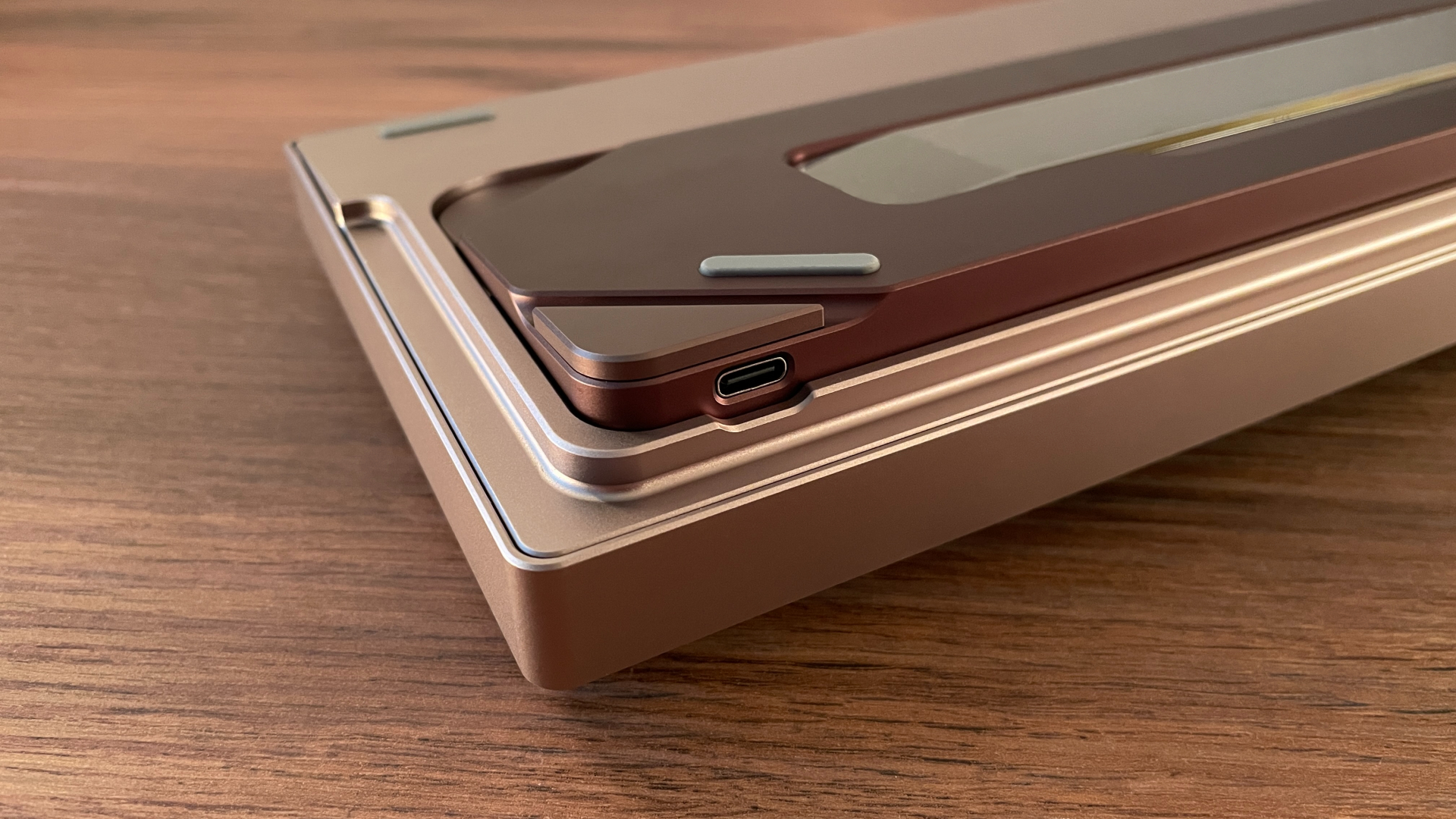
The side profile of the Hex80 is far from a simple flat edge. It features a stepped design with three distinct levels, creating additional depth and giving the aluminum case a more refined and sculpted appearance.
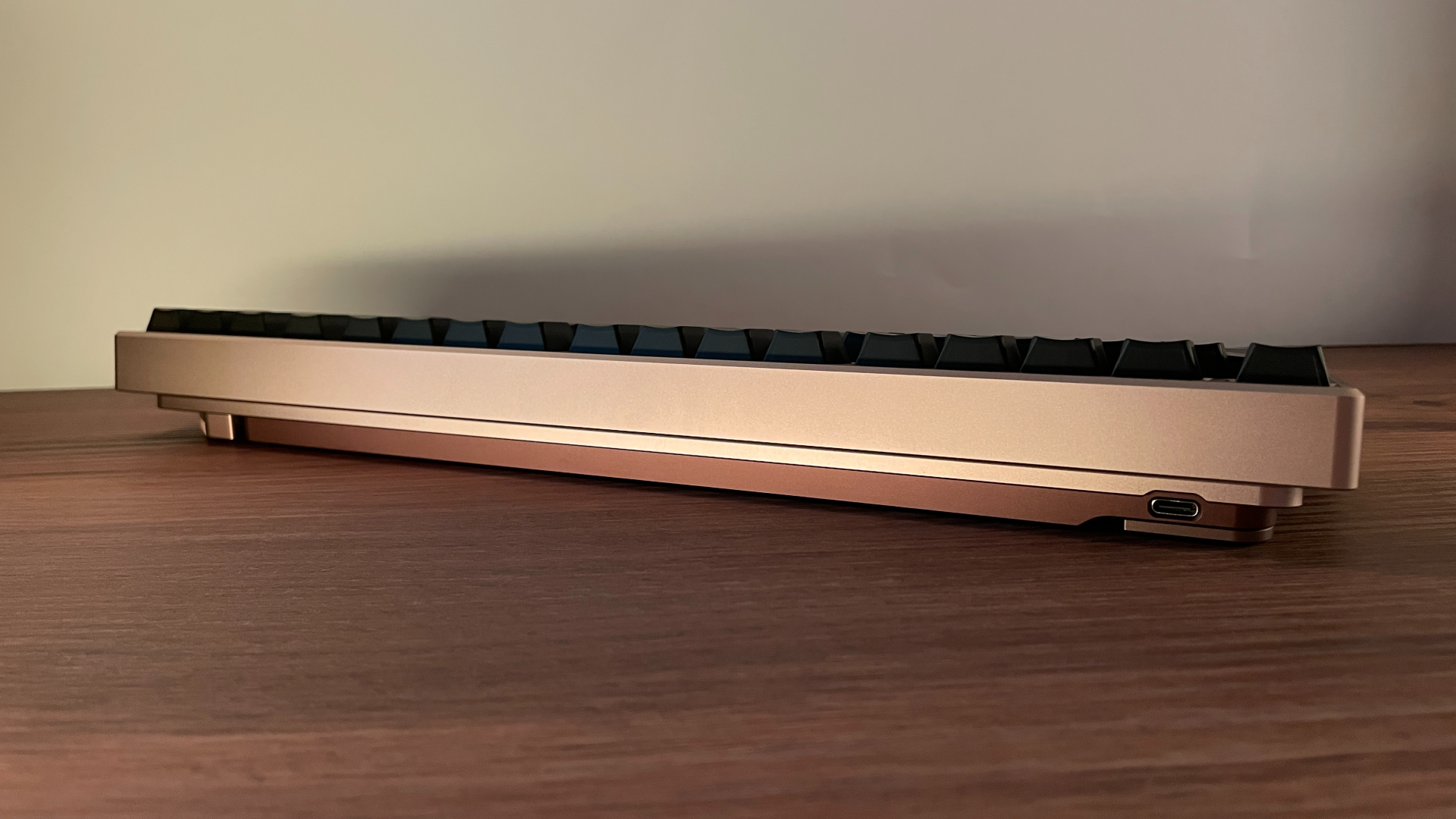
The back profile follows the same stepped design, with three distinct levels continuing across the back of the case. The USB-C port is located on the left side and blends cleanly into the rear design without interrupting its overall appearance.
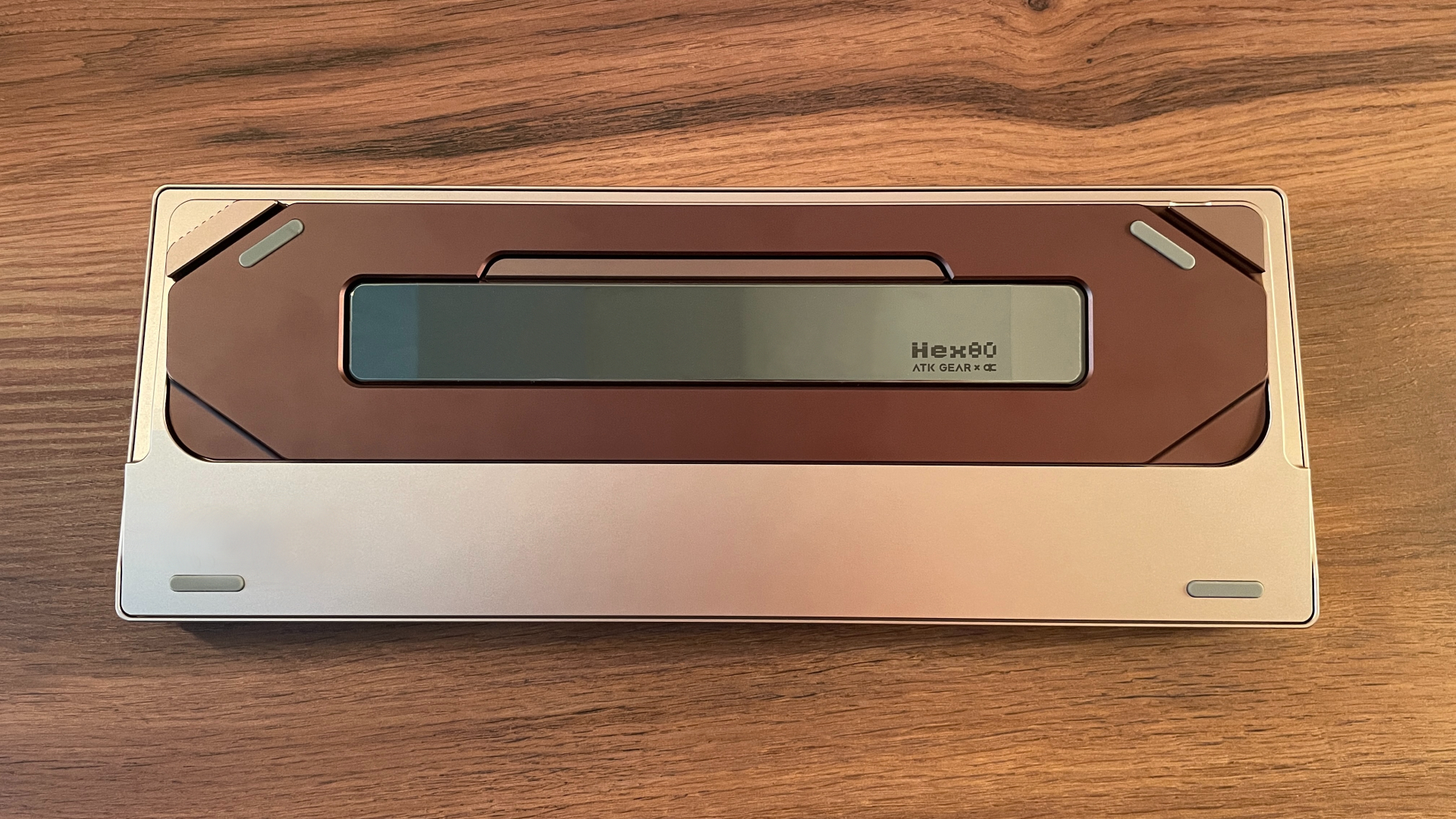
However, the most interesting details can be found on the underside of the keyboard. Unlike many keyboards where the underside is often overlooked, the Hex80 gives this area the same level of attention as the rest of the case. Here you’ll find a complex geometric design with multiple machined surfaces, aluminum accents, and carefully integrated details that give this part of the case a very unique character. At the center of the underside there is a mirror-polished PVD stainless steel weight, which serves as the main visual highlight of this part of the case.
Another important part of the overall appearance is the RGB backlighting. It is quite bright, with rich and saturated colors. One interesting detail is that the spacebar has three LEDs positioned underneath it instead of the usual single LED. It’s a small thing, but it shows – especially since the Hex80 comes with translucent keycaps out of the box.

These keycaps reveal every inconsistency in the backlighting, and a single LED under the spacebar would create an obvious bright spot in the center while leaving the sides noticeably dimmer. Using three LEDs solves that problem cleanly. It also works particularly well if you ever decide to replace the stock keycaps with something like a topographic-style set, where the intricate pattern across the spacebar needs even illumination to look its best end to end.

Connectivity
The Hex80 uses a wired-only connection, which is standard among high-performance Hall Effect keyboards, as it remains the preferred choice for achieving the lowest possible latency and consistent performance. The wired-only approach also comes with a small advantage. You never have to think about charging the battery before a long gaming session.
To ensure reliable performance, just make sure the keyboard is connected to a USB 3.0 port and use a high-quality data cable if you are not using the included one.
ATK HUB Software
The Hex80 is configured through ATK HUB, and the good news is that it’s available both as web-based software and as a traditional desktop application.
Personally, I almost always prefer web-based software. There’s nothing to install, nothing running in the background using system resources, and I can simply open on any PC whenever I need to change a setting. For me, this is a very convenient solution.
That said, I’m genuinely glad ATK also offers a dedicated desktop application. Having a second option is always reassuring, especially in case the web version is ever unavailable for any reason. More importantly, giving users both choices means everyone can simply use whichever method fits their preferences better.
Another thing worth mentioning is that the desktop software is available not only for Windows but also for macOS. Native support for macOS is still relatively uncommon among gaming peripherals, so it’s a nice addition for Mac users.
The functionality is identical across the web-based software and the desktop application, so regardless of which version you choose, you won’t be giving up any features or customization options. The only exception is one additional lighting mode available in the desktop application: music synchronization. This mode allows the RGB lighting to react to the audio playing on your PC.
The software itself is one of the better examples I’ve come across. It has a clean and stylish interface that feels pleasant to use, and ATK HUB even allows some customization, such as choosing between light and dark themes or different background images. One feature I genuinely like is how easy it is to access the web driver. There’s no need to bookmark the page or visit the ATK website every time you want to change a setting. Instead, the keyboard includes a built-in function that automatically opens your web browser and takes you directly to the web driver page. By default, this function is assigned to Fn + H, but it can be freely remapped to any key you prefer. It’s a small feature, yet one that makes everyday use noticeably more convenient.
ATK HUB includes all the modern customization features you would expect from a Hall Effect keyboard, while keeping everything organized and easy to navigate:
Light Settings is where you configure the keyboard’s RGB lighting. The two lighting zones I mentioned earlier can be customized independently. For the main keyboard backlighting, there are 21 built-in lighting effects available, while users who prefer complete control can also create their own per-key lighting. All the usual options are here, including brightness, animation speed, colors, and effect direction. One feature I found particularly useful is RGB color calibration. If your switches slightly alter the color of the backlighting due to the material of the top housing, you can fine-tune the output to compensate for it and achieve more accurate colors.
Trigger Settings is divided into three separate sections. The first section, Customization, contains all of the core Hall Effect settings, including actuation point adjustment, Rapid Trigger, and the option to enable Extreme Mode. The second section, Champion Presets, provides ready-made profiles created by professional esports players. Finally, the Hybrid Shaft section lets you select which magnetic switch model is installed under each key. This is especially useful if you’re using different switches for different keys.

Key Change Settings is dedicated to key remapping. The keyboard has four layers in total. One serves as the default layer while the keyboard is in Win mode, and another serves as the default layer when Mac mode is enabled. The remaining two are Fn layers, both of which are available regardless of the selected operating mode. This means that, in practice, you always have access to three customizable layers, while the fourth is reserved as the default layer for the operating mode you’re not currently using. That’s actually a pretty generous implementation, as many Hall Effect keyboards typically only offer a single default layer and one Fn layer.

Advanced Key Settings is where you’ll find most of the advanced Hall Effect features. This includes Rappy Snappy (RS), SOCD with four different modes, Dynamic Keystrokes (DKS), OKS, TGL, and Mod Tap. If you’re interested in getting the most out of magnetic switches or experimenting with more advanced key behaviors, this is likely the section you’ll spend the most time in.


Axial Alignment is responsible for switch calibration. Besides manual calibration, it also includes an automatic real-time calibration feature, which is enabled by default. In practice, this means the keyboard continuously fine-tunes itself during use, helping maintain precision sensing without requiring manual recalibration.
Macro Settings are exactly what the name suggests. This is where you can create, edit, and assign macros to any key, making it useful for both productivity tasks and more complex in-game actions.
Parameter Settings bring together a wide range of general keyboard options. Here you’ll find settings such as Mac Mode, WASD-to-Arrow, Windows Key Lock, Anti-Accidental Touch Mode, AI Match, and the option to switch between N-Key Rollover and 6-Key Rollover with Smart Detect support. This is also where you can adjust the polling rate from 1,000 Hz up to 8,000 Hz, configure the sleep timer, and customize the colors of the Caps Lock, Num Lock, and Scroll Lock indicators.

Controller Mode allows the keyboard to emulate a game controller. All controller-related options are grouped together here, making it easy to enable the mode and adjust the available settings.


Configuration Management is used for managing profiles. Besides saving profiles directly to the keyboard’s onboard memory, you can also save them locally in the software (or, in the case of the web configurator, in your browser’s local storage). If you create an ATK account, profiles can also be backed up to the cloud. Alternatively, you can simply export and import profile files manually whenever needed.
Other Settings contains firmware-related options. Here you can check the current firmware version, update the keyboard whenever a new release becomes available, or perform a factory reset if needed.
Besides the customization options, ATK HUB also includes a few useful resources. You can quickly access the FAQ, the user manual, and a direct link to ATK’s official Discord server, making it easy to find additional information or get support whenever needed.
Keycaps
The Hex80 comes with frosted PC keycaps in the Cherry profile. They are quite thick, measuring around 1.4–1.5 mm. The legends are applied using UV printing, where ink is printed directly onto the keycap surface and cured with ultraviolet light. Unlike simpler printing methods, UV printing creates a stronger bond with the surface, offering better resistance to fading and wear over time. While it still cannot match the almost everlasting legends of double-shot or dye-sublimated keycaps, a well-executed UV print should easily last for years of heavy use, outperforming methods like pad printing or silk screening.
I’m generally not a big fan of polycarbonate keycaps or fully transparent designs, but I have to admit these are some of the better examples I’ve come across, and I actually ended up liking them in their own way. They are not completely transparent like glass; instead, the frosted finish creates a much softer look and helps diffuse the RGB lighting nicely. What I especially like is that with the backlight turned off, they almost look like regular black keycaps, without any obvious transparency. The surface texture was also a pleasant surprise – it feels very nice to the touch, almost as if there is some kind of coating applied to it.
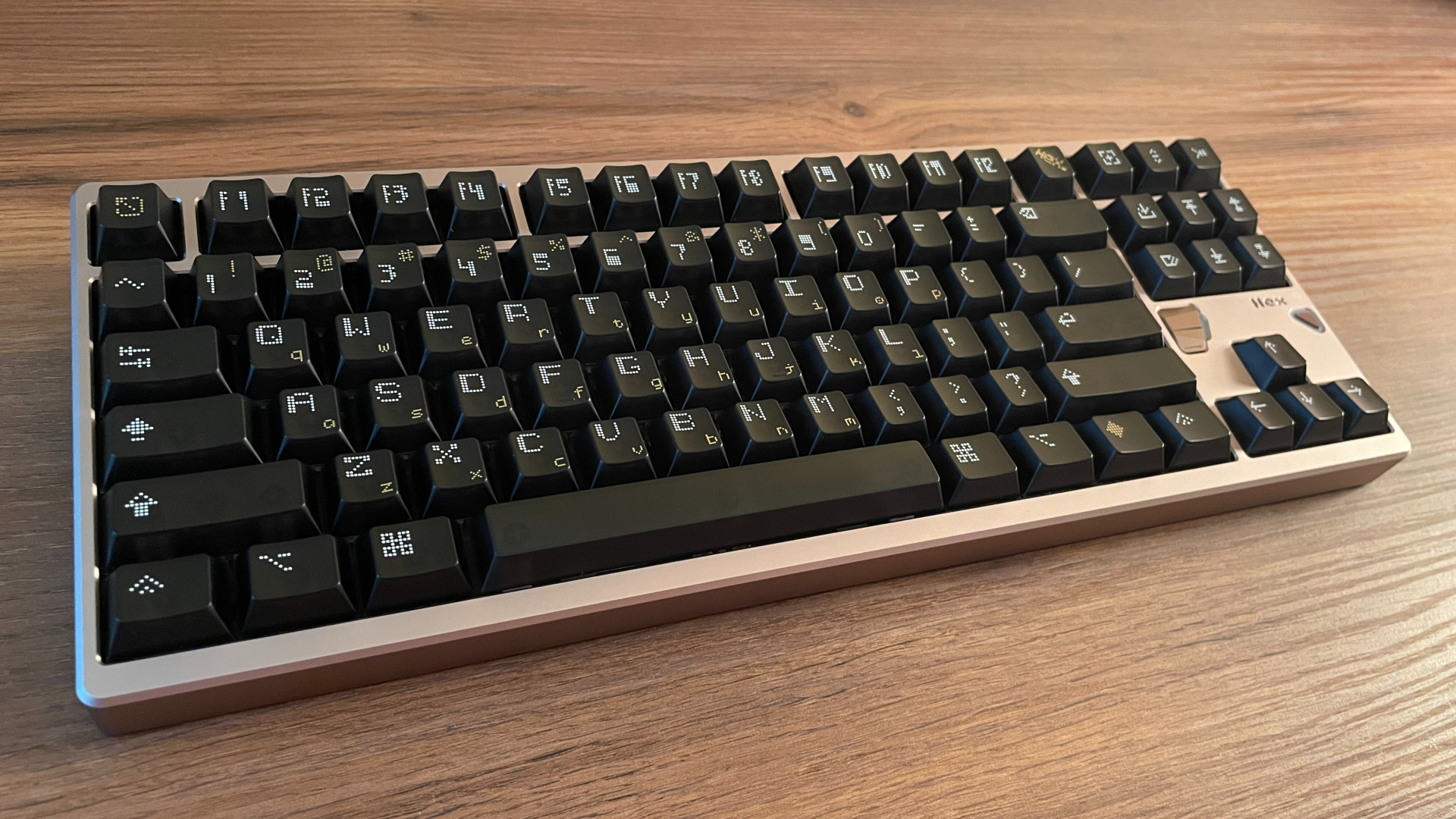
The legends are fairly large and feature a dotted font that gives them a slight pixel-inspired appearance. Another interesting design choice is the use of both uppercase and lowercase legends on the keycaps, which adds some visual character. I also like that many keys replace traditional text legends with stylized icons instead. Besides making the design more unique, this is actually a practical choice for people who like remapping their keys, since symbols are more universal and don’t tie a key into a specific function (sure, you can still remap everything no matter what the keycap says, but your inner perfectionist might not be completely satisfied).
When it comes to the overall style, this is where opinions will probably vary, as it mostly comes down to personal preference. The keycaps are arguably the one element of the keyboard that immediately highlights its gaming nature. Some people will appreciate this design, while others may prefer something more traditional and subtle. Personally, I would have liked to see a more classic approach with double-shot or dye-sublimated PBT keycaps, but I can still appreciate the thought that went into this design.
Owlab Ti Switches
The Hex80 comes equipped with Owlab Ti linear magnetic switches. These are currently among the most popular and well-regarded magnetic switches on the market, and they have earned that reputation for good reason.
Looking closer at the switches themselves, they feature a closed-bottom housing, a transparent top housing, and an integrated light diffuser that helps spread the RGB lighting more evenly. Owlab Ti switches also come factory lubricated and feel very smooth right out of the box. I didn’t notice any scratchiness or spring ping during my time using them.
One thing that impresses me is just how minimal the stem wobble is. On a mechanical keyboard this mostly comes down to typing feel, but on a Hall Effect keyboard it also plays a role in how consistently features like Rapid Trigger perform. This is one of those details that is easy to overlook, but it contributes to the overall precision and consistency of the keyboard, especially when using it at its limits with very low sensitivity settings.
There are two versions of the Owlab Ti switches, depending on the spring weight: 40 g and 50 g. The Hex80 comes with the lighter 40 g variant, which I think strikes an excellent balance. They are on the lighter side, yes, but not so light that I found myself triggering keys by accident. At the same time, they remain comfortable during long typing sessions or extended gaming without causing finger fatigue.

From a performance perspective, these switches are specified with a bottom-out magnetic flux rating of 750 ±50 Gs, which is a fairly high value. A stronger magnetic signal allows the keyboard to detect key movement more accurately and consistently, especially when using features such as Rapid Trigger or very low actuation settings. In other words, it’s exactly the kind of switch you want to see in a high-performance Hall Effect keyboard.
Overall, I think the Owlab Ti are an excellent choice. These are switches that many enthusiasts buy separately to upgrade their Hall Effect keyboards, so it is genuinely great to see them included as the stock option.
Of course, the Hex80 supports hot-swapping, so you can experiment with different switches if you want to customize the feel. Just make sure they are physically compatible and use an N-pole-down magnet orientation.
Moving on to the stabilizers, the Hex80 comes equipped with plate-mounted stabilizers that are factory-lubed and perform surprisingly well. There’s virtually no wire rattle or ticking, and they have a very tight fit in the plate without any unnecessary movement. In the end, I didn’t feel the need to make any additional modifications and was perfectly satisfied with their stock performance.
Structure and Mounting
As I mentioned earlier, the Hex80 has no visible screws, yet getting inside the keyboard is surprisingly straightforward. Unlike many manufacturers who hide screws beneath rubber feet – meaning you have to peel them off, only to find that the rubber feet rarely stick back down quite as well as they did from the factory – the Hex80 completely avoids this issue. All you need to do is remove a few keycaps to access six hidden screws. Once those are removed, the top case lifts off easily, giving you full access to the keyboard’s internals. It’s a simple yet elegant solution that keeps the exterior clean without making disassembly any more complicated.
Once opened, you can see that the Hex80 uses a gasket mount design. Instead of mounting the plate directly to the case, it rests on soft gasket strips that isolate it from the aluminum case. This helps soften the impact when bottoming out, resulting in a softer typing experience while also reducing vibrations and unwanted resonance inside the case.
One of the more interesting design choices is the use of a carbon fiber plate instead of the aluminum plate found in many Hall Effect keyboards. There are also no flex cuts, which is a common choice for Hall Effect keyboards due to the need for a more stable mounting structure. Compared to aluminum, carbon fiber produces a slightly quieter and less high-pitched sound profile while still maintaining the rigidity that Hall Effect keyboards benefit from. As a bonus, it also looks fantastic under the keycaps, adding a nice visual touch whenever you take a few keycaps off for cleaning or maintenance.
Beneath the plate are three layers of sound dampening:
- PORON Plate Foam
- IXPE Switch Pad
- PET Film
Next comes a 1.6 mm thick PCB, which also has no flex cuts. It does not support screw-in stabilizers. Under the PCB, you’ll find two additional layers of sound dampening layers:
- PORON Bottom Case Foam
- IXPE Bottom Case Pad
Overall, the Hex80’s internal design shows a clear focus on balancing rigidity, sound quality, and typing feel.
Gaming Performance
The Hex80 has been a great keyboard for gaming. It performs exactly how I would expect from a high-end Hall Effect keyboard. The input feels fast and consistent, and I never ran into situations where the keyboard started behaving unpredictably or stopped registering inputs correctly when pressing many keys at the same time. For me, this is one of the most important aspects of gaming performance, because impressive numbers on paper don’t always translate into reliable real-world performance.
That being said, the Hex80 also has the specifications to back it up. It features an 8000 Hz polling rate, a 32000 Hz scanning rate, and a powerful 480 MHz MCU. The actuation point can be adjusted in 0.001 mm steps, while Rapid Trigger sensitivity can be fine-tuned down to 0.005 mm. This gives you a huge amount of flexibility when tuning the keyboard, whether you prefer an extremely sensitive setup or something slightly more forgiving.
As a nice bonus, the Hex80 also supports gamepad mode. Not every Hall Effect keyboard offers this functionality yet, so it’s great to see it included here for users who play games that benefit from analog movement or simply want to experiment with controller emulation. It’s a welcome addition to the overall feature set.
Another interesting detail is the internal design. ATK claims that the Hex80 uses architecture with 15 dedicated chips, in which every five to six keys are handled by a separate chip. After opening the keyboard, I was able to confirm the presence of 15 separate chips on the PCB. While I can’t directly measure how much of an impact this design has compared to other implementations, it is clearly aimed at maintaining stable input processing even under demanding conditions. In practice, I did not experience the kind of issues that can sometimes appear on lower-end Hall Effect keyboards, where highly sensitive settings combined with many simultaneous key presses can lead to inconsistent behavior.
After spending a lot of time with it, the Hex80 left me with the impression of a very well-tuned gaming keyboard. It delivers the speed and customization you expect from a Hall Effect keyboard, but more importantly, it does so without compromising consistency.
Typing Experience
Typing on the Hex80 turned out to be a really enjoyable experience. The stock Owlab Ti switches with 40g springs provide a light and exceptionally smooth feel, making long typing sessions feel quick and effortless. One thing I especially want to highlight is the implementation of the gasket mount. The Hex80 has a noticeable amount of flex. In fact, this might be the most bouncy Hall Effect keyboard I’ve used so far. That’s quite unusual for Hall Effect keyboards, which typically prioritize a stiffer internal structure. However, this softer typing feel is exactly what makes the Hex80 more enjoyable to type on.
When it comes to acoustics, the Hex80 has a rather unique typing sound profile. It sits somewhere between clacky and marbly, although I would say it leans more toward the marbly side. The sound is clean and lively, with a slightly higher-pitched tone that gives the keyboard its own character. There is no noticeable case ping or hollow resonance, which can sometimes be an issue with aluminum keyboards. The gasket mount combined with the five layers of sound dampening clearly do their job well, helping the keyboard maintain a more refined sound profile.
One more thing worth mentioning is the impact of the stock polycarbonate keycaps on the sound profile. They are a big part of what gives the Hex80 its brighter, higher-pitched character. If you swap them for a quality set of thick PBT keycaps, the sound changes noticeably, becoming much deeper and creamier.
Pros and Cons
Final Verdict

The Hex80 is probably the best-looking Hall Effect keyboard I’ve seen so far, but fortunately, it offers much more than just good looks. Excellent build quality, enjoyable typing experience, rich accessory bundle, and overall attention to detail make it feel much closer to a custom keyboard for enthusiasts than a typical gaming-focused Hall Effect board.
At the same time, none of that comes at the expense of gaming performance. The Hex80 never feels like it’s forcing you to choose between gaming and typing. It handles both equally well, which is something I don’t get to say about every Hall Effect keyboard I’ve tried.
It certainly isn’t the cheapest option, but if you care not only about gaming performance, but also about craftsmanship and the overall aesthetic of your keyboard, the Hex80 is hard to overlook.
You can also get 5% off with your purchase on ATK.store using code HLPLANET.

Controller and mechanical keyboard enthusiast. Tech reviewer, regularly sharing thoughts about gadgets and computer peripherals.